When Should You Convert an Excel or Google Sheets File Into a Web App?
Convert the spreadsheet when more than one person types into it, when its numbers leave it by hand, or when outsiders need part of it. Until then, keep the sheet and automate around it. For a small business the decision comes down to three prices: $100, $300 or $1,000.
A $100 automation leaves the file in place and acts on it. A $300 tool gives one job its own page. A $1,000 application adds logins and replaces the sheet with a database.
The spreadsheet itself is rarely the problem. The problem is the work around it: retyping a row into a text, emailing a stale copy, or a formula someone broke in March. Each has a fix that costs less than most owners expect, and the smallest ones are listed on our automation page.
This guide covers the signs that a sheet has outgrown itself and the research on what breaks. It then compares three conversion paths, four no-code converters at October 2026 prices, and the three-year cost of each. If the only question is "automation or a custom app", read the shorter spreadsheet automation versus a custom app.
| Sign | What it usually means | Smallest fix |
|---|---|---|
| Two people edit the same tab | The sheet has become a shared record | A page in front of the sheet, $300 |
| Numbers are retyped into texts, emails or invoices | The sheet is a source that nothing reads | A $100 automation that reads the sheet and sends the message |
| A customer or vendor needs to see one row | The sheet is doing a portal's job | An application with logins, $1,000 |
| "Which version is the right one?" | Copies have replaced the record | One shared page, one record |
| A formula broke and nobody noticed for weeks | Logic lives in cells, with no tests | Rebuild the logic in code with tests, from $300 |
What Should Stay in a Spreadsheet?
Anything one person uses to think stays in a spreadsheet. A pricing model the owner changes weekly, a one-off analysis, a budget with twelve scenarios: these change shape faster than any app can follow. The person changing them is also the only reader, so converting them buys nothing.
Three tests help. If one person edits the file and the same person reads it, keep it. If the columns change every month, keep it, because the structure has not settled.
If the file is a calculator rather than a record, keep it; a form in front of it serves anyone who needs the answer. A spreadsheet to app conversion pays off when the file has become a shared record or a hand-fed source of messages. Most small businesses have one or two files like that, and a dozen that are fine as they are.
What Breaks in a Spreadsheet as a Business Grows?
Four things break, usually in this order: formulas, then sharing, then the scripts that automate the file, and only last the size limits. The research on formula errors matters most, because nearly every owner assumes their own file is the exception.
Formula errors are the norm
Most business spreadsheets that auditors have examined turned out to contain mistakes. Ray Panko's summary at the University of Hawaii counts nine audits since 1995: 163 spreadsheets, 83% with errors, weighted by study size. The five audits with the strictest methods, 55 spreadsheets in all, found important errors in 91%.
Only one audit in that set found errors in fewer than 86% of the files it examined. The largest study, by Powell, Baker and Lawson, audited 50 working spreadsheets and found errors in 86% of them, with a 0.9% cell error rate. Across the five studies that reported it, cell error rates ran from 0.2% to 2.5%.
A 1% error rate sounds small until a file has a few hundred formulas. Those audits are why conversion work starts by rebuilding the logic with tests, instead of copying formulas into a new tool.
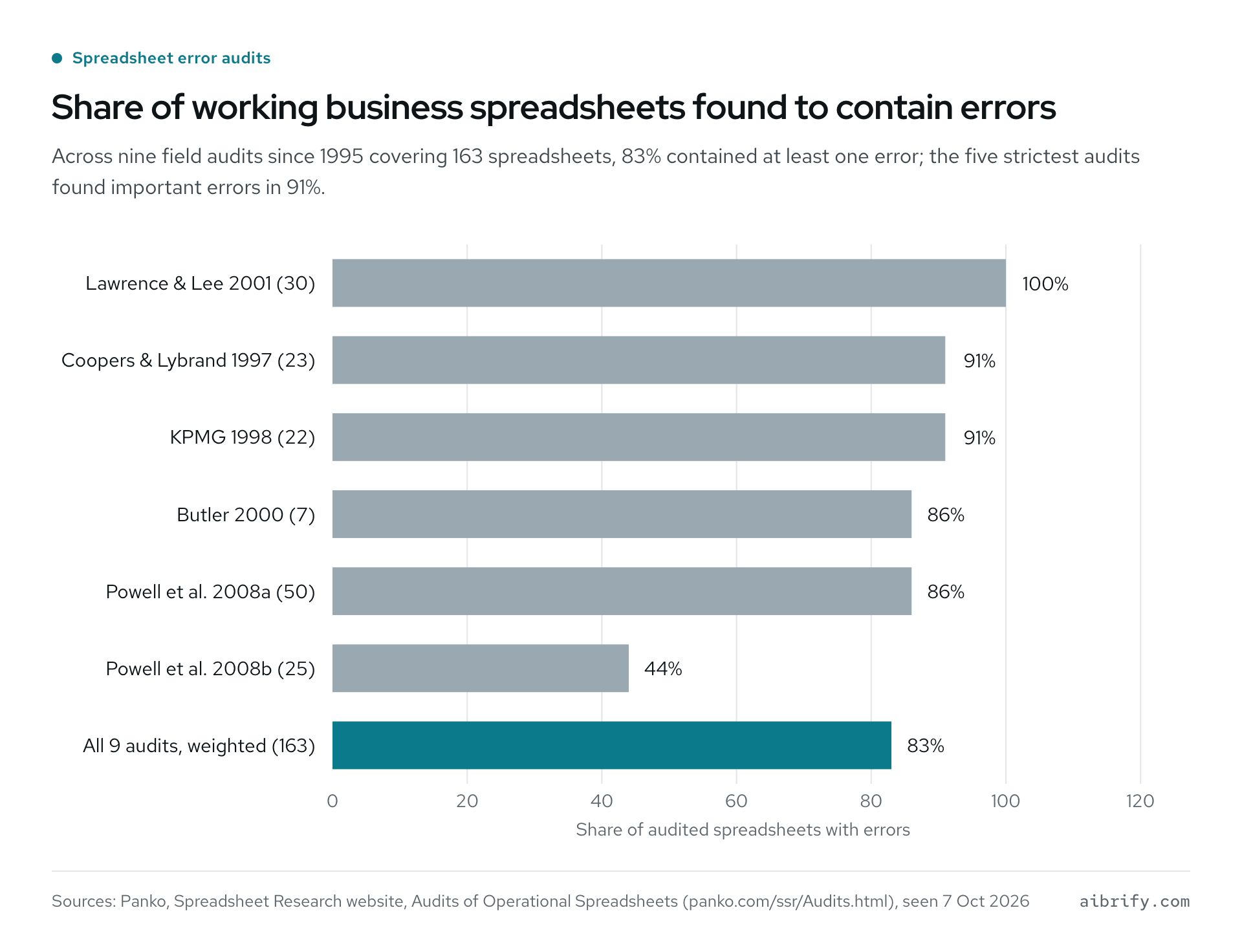
Bars show the share of files with errors in each audit.
| Audit (year) | Spreadsheets audited | Share with errors |
|---|---|---|
| Lawrence and Lee (2001) | 30 | 100% |
| Coopers and Lybrand (1997) | 23 | 91% |
| KPMG (1998) | 22 | 91% |
| Butler (2000) | 7 | 86% |
| Powell, Baker and Lawson (2008a) | 50 | 86% |
| Powell, Baker and Lawson (2008b) | 25 | 44% |
| All nine audits since 1995, weighted | 163 | 83% |
Size limits are real but rarely the first problem
Google Sheets allows up to 20 million cells or 100 MB per spreadsheet. Excel allows 1,048,576 rows by 16,384 columns on a worksheet and 32,767 characters in a cell. A small business almost never reaches either ceiling.
What it does reach is slowness and conversion loss. An Excel file converted to Sheets drops any cell with more than 50,000 characters, which matters when notes or contract text were pasted into cells. A sheet with tens of thousands of lookup rows opens slowly on a phone, and a phone is where the owner reads it.
The scripts that automate a sheet have quotas
Many spreadsheets already have a script behind them. On a consumer Gmail account, Google Apps Script allows 100 email recipients a day and 90 minutes of total trigger runtime. A Google Workspace account raises those to 1,500 recipients and 6 hours.
Every run stops at 6 minutes. URL fetch calls are capped at 20,000 a day for consumer accounts and 100,000 for Workspace. Those limits are generous for a reminder that goes to 20 clients.
They are tight for a daily job that emails 200 customers and pulls a supplier's price list. When a script hits a quota, the people waiting on it simply hear nothing. That is often the day the sheet gets converted.
What Are the Three Ways to Turn a Spreadsheet Into an App?
There are three paths, and the price rises with how much of the spreadsheet gets replaced. The first keeps the file and automates around it ($100). The second moves one job onto its own page while the sheet stays the record ($300).
The third swaps the sheet for an application that has logins and a real database ($1,000). A fourth size, the system, exists for spreadsheets that run a whole business.
Path 1: keep the spreadsheet, add one automation ($100)
An automation reads the sheet and reacts to it. It sends a text when stock falls below a number, emails a report every Monday, or reminds a client of a deadline. Nothing changes for the person who maintains the file.
Typical projects at this price are low-stock alerts from a spreadsheet for a shop, deadline reminders for an accountant, and a report that sends itself. The work usually takes two or three days.
Path 2: a tool with its own page ($300)
Here one job leaves the spreadsheet and gets a page. Examples: a quote sheet a contractor fills in on site, an open-house sign-in form, a repair request page. The page writes a clean row into the sheet, so the record stays where it was.
Nobody types into the grid directly anymore. This is the right size when the pain is data entry rather than data. What a $300 tool looks like walks through one build, and the work takes about a week.
Path 3: an application with logins ($1,000)
When several people need their own view, or a customer must see one row and nothing else, the sheet becomes a database. An application with logins holds the data, shows each role what it may see, and talks to the owner's other tools. The owner keeps a spreadsheet export, because the export is what accountants and lenders ask for.
Typical examples are a salon's membership and package tracker and a wholesale order form with price tiers. A contractor's estimate builder with materials and a tutoring center's progress report generator are the same size. Each is $1,000 and takes two to three weeks.
When a system is the honest answer ($5,000+)
A spreadsheet that runs a whole business, with sales, scheduling, inventory and payroll on separate tabs, is a system. That gets scoped together first, with several roles, integrations and a plan for growth. The custom software cost guide explains how the scope is set before the price.
| Path | Fixed price | Time | The spreadsheet becomes | Best when |
|---|---|---|---|---|
| Automation around the sheet | $100 | 2 to 3 days | Stays exactly as it is | Numbers are retyped into messages |
| Tool with its own page | $300 | About a week | The record, with a page in front of it | Data entry is the pain |
| Application with logins | $1,000 | 2 to 3 weeks | An export from a real database | Roles, customers, outside eyes |
| System | $5,000+ | Scoped first | Several databases and roles | The sheet runs the business |
Which No-Code Tools Convert a Spreadsheet to an App, and What Do They Cost?
Four builders do most of this work in 2026: AppSheet from Google, Glide, Softr and Microsoft Power Apps. As of October 2026 their paid plans start between $5 a user a month and $25 a month. All four offer a free way to start.
They suit one person building one internal tool. They get expensive or constrained once the tool reaches customers.
AppSheet reads a spreadsheet and generates a mobile-style app. Pricing is per user: Starter $5, Core $10 and Enterprise Plus $20 a user a month, and prototyping with up to 10 users is free. Core is included in most paid Google Workspace plans, so a business already on Workspace may pay nothing extra.
Glide builds a web app from Google Sheets, Excel, Airtable or a database, and prices by plan and usage credits rather than per user. Glide's plans run Free, Basic $25, Plus $50 and Pro $125 a month, with Enterprise priced on request. Basic allows 2 team members and 2 published apps with 100 credits a month; Pro starts at 5 members with unlimited apps and 500 credits.
Softr builds portals and internal tools on top of Airtable, Google Sheets and its own database. Plans are Free, Basic $19, Pro $99 and Business $329 a month, with Enterprise on request and two months off on yearly billing.
Softr's Basic plan includes one builder plus 5 team and 5 client app users; Pro includes two builders plus 10 team and 50 client users. Extra builders cost $5 to $20 a month, and extra app users are billed separately from Pro upward.
Power Apps is Microsoft's builder for businesses on Excel and Microsoft 365. The Premium plan is $20 per user a month, paid yearly, with a free Developer Plan for building and testing. Like AppSheet, the bill grows with every person who logs in.
| Builder | Plans, as of October 2026 | Priced by | Watch for |
|---|---|---|---|
| AppSheet (Google) | Free to prototype with 10 users; $5, $10 or $20 a user a month | Users | 2,500 rows per AppSheet database on Starter and Core |
| Glide | Free; $25, $50 or $125 a month; Enterprise on request | Plan tier and credits | 2 team members on Basic; credits run out |
| Softr | Free; $19, $99 or $329 a month; Enterprise on request | Plan tier, builders, app users | 5 team users on Basic; extra builders $5 to $20 |
| Power Apps (Microsoft) | Developer Plan free; Premium $20 a user a month, paid yearly | Users | Per-user bill grows with headcount |
Where the builders stop
They stop in three places. First, the per-user meter: a tool that 12 people open costs $120 a month on AppSheet Core and $240 on Power Apps Premium, every month. Second, the data: AppSheet's own database allows 2,500 rows per database on Starter and Core, and credits on Glide run out at the busiest moment.
Third, the exit. The app lives on the vendor's platform, so a change of vendor means a rebuild, and the business owns its data but not the app. For one person automating their own job, a builder on a free or $19 plan is still the right first move.
How Much Does Converting a Spreadsheet Cost Over Three Years?
For a five-person tool, the no-code builders run from $684 to $4,500 over three years at October 2026 list prices, before anyone's time to build. A $1,000 fixed-price application plus optional hosting ($10 to $30 monthly) comes to $1,360 to $2,080, and the code is the owner's. In year one the builders cost less; by year three the fixed-price app sits in the middle of the range.
The comparison assumes five people use the tool and nobody is paid to build it on the builders. It also assumes no changes are ordered after the 90-day fix period on the fixed-price app. A Care plan at $49 or $149 a month would add to the fixed-price column; a freelancer's hours would add to the builder columns.
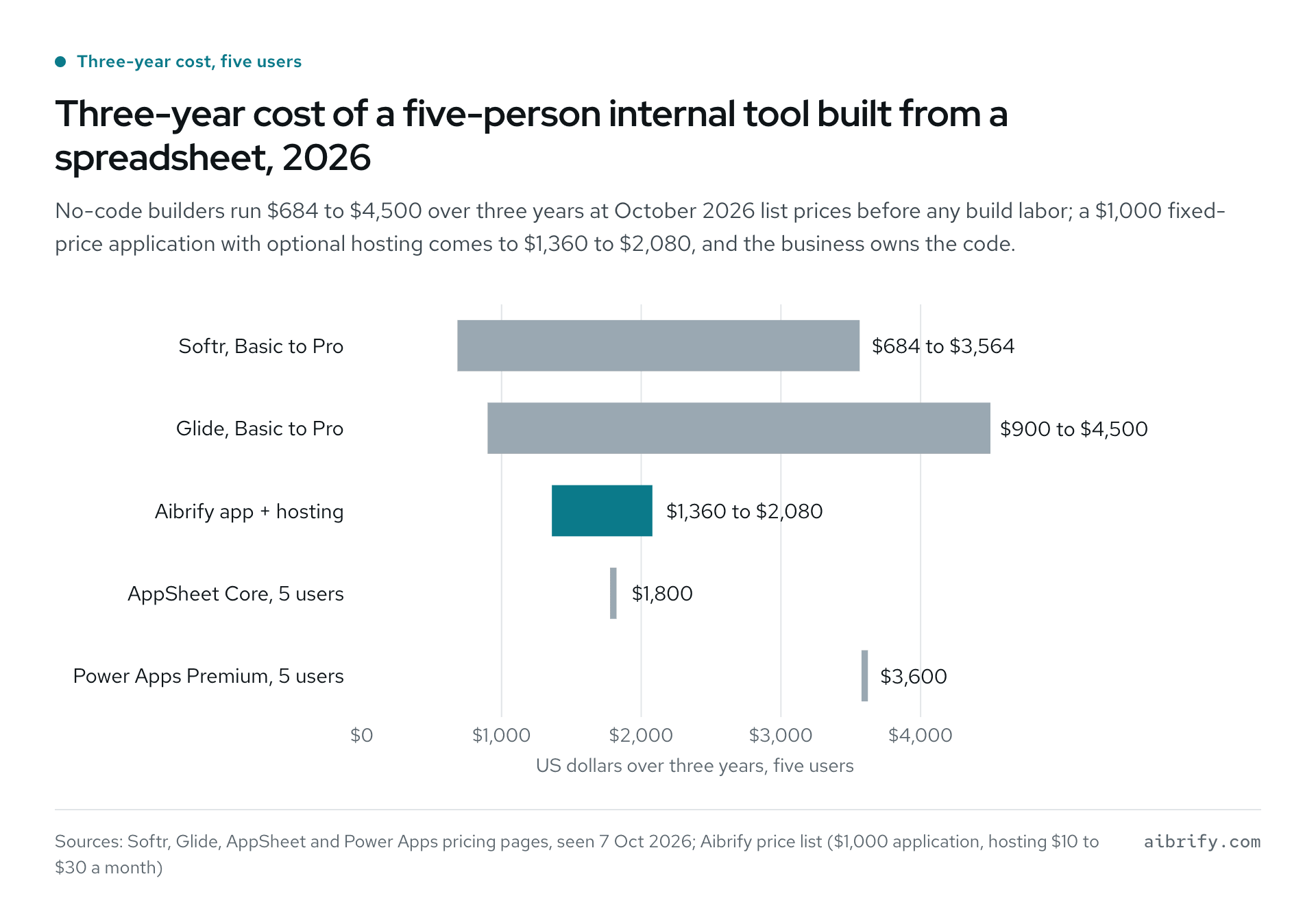
Bars show three-year totals at list prices for five users.
| Option | Monthly cost | Year one | Three years | Assumption |
|---|---|---|---|---|
| Softr, Basic to Pro | $19 to $99 | $228 to $1,188 | $684 to $3,564 | Basic covers 5 team users, Pro covers 10 |
| Glide, Basic to Pro | $25 to $125 | $300 to $1,500 | $900 to $4,500 | Pro starts at 5 team members |
| AppSheet Core, 5 users | $50 | $600 | $1,800 | $10 a user; no extra cost if your Workspace plan includes Core |
| Power Apps Premium, 5 users | $100 | $1,200 | $3,600 | $20 a user, paid yearly |
| Aibrify application with logins | $10 to $30 hosting, optional | $1,120 to $1,360 | $1,360 to $2,080 | $1,000 once, code owned by the business |
Two things the table leaves out cut both ways. Builder subscriptions include hosting, security updates and new features, which a one-time build does not. A one-time build includes the labor, which a subscription never does.
How Does the Conversion Actually Work?
Five steps, and the owner's share is about an afternoon.
- Name the job the sheet does. Record, calculator, form or report. Most sheets do two of these, and the conversion separates them.
- Clean the columns. One header row, one data type per column, no merged cells, no notes typed into number cells. This is the owner's step.
- Pick the smallest path. Retyping calls for a $100 automation, data entry for a $300 page, roles and outsiders for a $1,000 app.
- Build in the open. The owner checks the work on a phone as it comes together, using real rows rather than sample data.
- Keep the export. Every tracker and order form keeps a one-click export back to a spreadsheet, so the accountant and the habit both survive.
Four lines make the brief: what the sheet tracks, who types into it, what leaves by hand, who must never see it. The rest is the developer's problem.
Writing those four lines takes ten minutes, and how to write a software brief has examples. A screenshot of the sheet with sensitive columns hidden is the only attachment that helps.
Do You Need a Google Sheets Automation Expert, a Developer or a Builder?
Match the helper to the path. A Google Sheets automation expert working in Apps Script suits Path 1 when the job stays inside Google's quotas. A no-code builder suits one person's internal tool.
A developer, or a software company with fixed prices, suits anything with logins, customers or money. Ownership differs more than price.
With a freelancer's script, the code sits in the owner's Google account, but the knowledge of how it works leaves with the freelancer. With a builder, the app runs on the vendor's platform under a subscription. With a fixed-price build, the client owns the code, the repository and the accounts, as who owns the code explains.
Some owners try a fourth route and build the app themselves with Cursor, Lovable, Bolt or Replit. That often produces a working demo and sometimes a working tool. When one breaks, a $100 diagnosis in 24 hours is credited against the fix; fixes cost $100 or $300 and stabilization $1,000.
The vibe-coded app repair guide covers what usually goes wrong. For a wider comparison of consultants, freelancers and fixed-price companies, see small business automation consultant versus DIY.
What Does Aibrify Charge to Turn a Spreadsheet Into an App?
Aibrify is a software company in Los Angeles that builds custom automations and software for small businesses at fixed prices. For spreadsheet work the ladder is $100 for one automation around the sheet and $300 for a tool with its own page. A $1,000 application brings logins, and a system with several roles and integrations is $5,000 and up, scoped together first.
Every price is quoted in writing before work starts; the full list is on the automation page and the pricing page. The client follows the build on their phone while it takes shape, and from delivery holds the code, repository and accounts outright. Hosting with Aibrify is optional at $10 to $30 a month, or the app can be taken anywhere.
Anything broken in the delivered scope is fixed free for 90 days, and later changes are quoted at the same fixed prices. A Care plan is the alternative: $49 a month covers 1 hour of changes with a reply in 2 business days. The $149 plan covers 4 hours a month with a reply the next business day, and larger builds are described on the custom software page.
Automations integrate with the tools you already use. They read a spreadsheet, a form, a calendar, a text message or an email, and they send texts, emails or WeChat messages.
To start, answer the four questions at /start, or write to us by text, email or WeChat. The reply comes within 1 business hour, with no sales calls and no meetings required.
Frequently Asked Questions
Can I keep using my spreadsheet after it becomes an app?
Yes, in two of the three paths the spreadsheet stays. A $100 automation never touches the file, and a $300 tool writes clean rows into the sheet, which remains the record. The $1,000 application takes over as the record but keeps a one-click spreadsheet export for the accountant.
How much does it cost to convert Excel to a web application?
At a fixed-price software company, $100 buys an automation around the file and $300 a tool on its own page. Logins and roles make it a $1,000 application, and a multi-role system starts at $5,000. No-code builders charge $19 to $125 a month by plan, or $5 to $20 per user a month, before the hours spent building the app.
Is Google Sheets or Excel a database?
No, both are grids of cells, and both allow large files: 20 million cells in Google Sheets and 1,048,576 rows per Excel worksheet. A database adds what a shared business record needs: one row per record, a type enforced on every column, and logins. It also adds permissions per role and a history of who changed what.
What is the difference between AppSheet, Glide and Softr?
AppSheet is Google's builder, priced per user at $5, $10 or $20 a month and bundled with most paid Workspace plans. Glide prices by plan tier and usage credits, from free up to $125 monthly. Softr builds portals on Airtable, Google Sheets or its own database, from free to $329 a month; all three host the app themselves.
How long does it take to turn a spreadsheet into an app?
A $100 automation that works around the sheet usually ships in 2 to 3 days. A $300 single-page tool takes about a week, and a $1,000 application 2 to 3 weeks. The owner's part is an afternoon of cleaning columns, then reviewing each piece on a phone.
Who owns the app once it is built?
With Aibrify, everything delivered belongs to the client from day one: code, repository and accounts, with optional hosting between $10 and $30 a month. With a no-code builder, the business keeps its data while the app itself stays on the vendor's platform for as long as the subscription runs. Leaving a builder means rebuilding the app somewhere else.
What happens when the app breaks or needs a change?
For 90 days after delivery, anything broken in the agreed scope is fixed at no charge. After that, each change gets its own fixed quote, or a Care plan covers it. The $49 plan gives 1 hour of monthly changes, answered within 2 business days; $149 gives 4 hours with next-business-day replies.
Should I build the app myself with Cursor, Lovable, Bolt or Replit?
For a demo or a personal tool, yes, because trying costs little. For a tool that touches customers, money or logins, the risk is an app that works until the day it does not. Apps built with those tools get a $100 diagnosis within 24 hours, credited to the fix; fixes run $100 or $300, stabilization $1,000.