


How Do You Set Up and Verify a Google Business Profile?
Setting one up is free: sign in with the owner's own Google account, open business.google.com/add, enter the name, category, address or service area, phone and website, then verify with the method Google offers. Google picks the method and it cannot be changed. A verification video is one live, continuous take of at least 30 seconds, and Google says the review takes up to 5 business days (Google Business Profile Help).
A Google Business Profile is a business's free listing on Google Search and Google Maps: the address, hours, phone number, photos and reviews all live there. It was called Google My Business until the 2021 rename (Search Engine Journal); Google's Chinese help center calls it "Google 商家资料".
Aibrify is a bilingual software studio in Los Angeles that sets up the Google Business Profile together with the website it builds. The owner's Google account stays the owner, Aibrify fills in the profile as a manager, and the owner gets guidance while recording the verification video.
Websites start at $390 with hosting at $5 a month. This guide covers every step for doing it yourself, including the naming rule Google changed in 2026.
Why Does a Google Business Profile Matter So Much for a Local Business?
Because customers read Google reviews and the map results before they call or walk in. The BrightLocal Local Consumer Review Survey 2026 asked 1,002 US adults: 97% read reviews for local businesses, 71% read them on Google, and 89% expect a response to their reviews.
Where a business ranks on the map depends heavily on the profile itself. The Whitespark Local Search Ranking Factors 2026 report invited 47 local search experts to rate the factors. In the map pack and Google Maps, profile signals carry 32% of the weight, reviews 20% and the website's on-page signals 15%.
In the regular local results below the map, the weights flip: on-page signals carry 33%, links 24% and the profile only 7%. The profile wins the map and the website wins the regular results, so a business needs both.
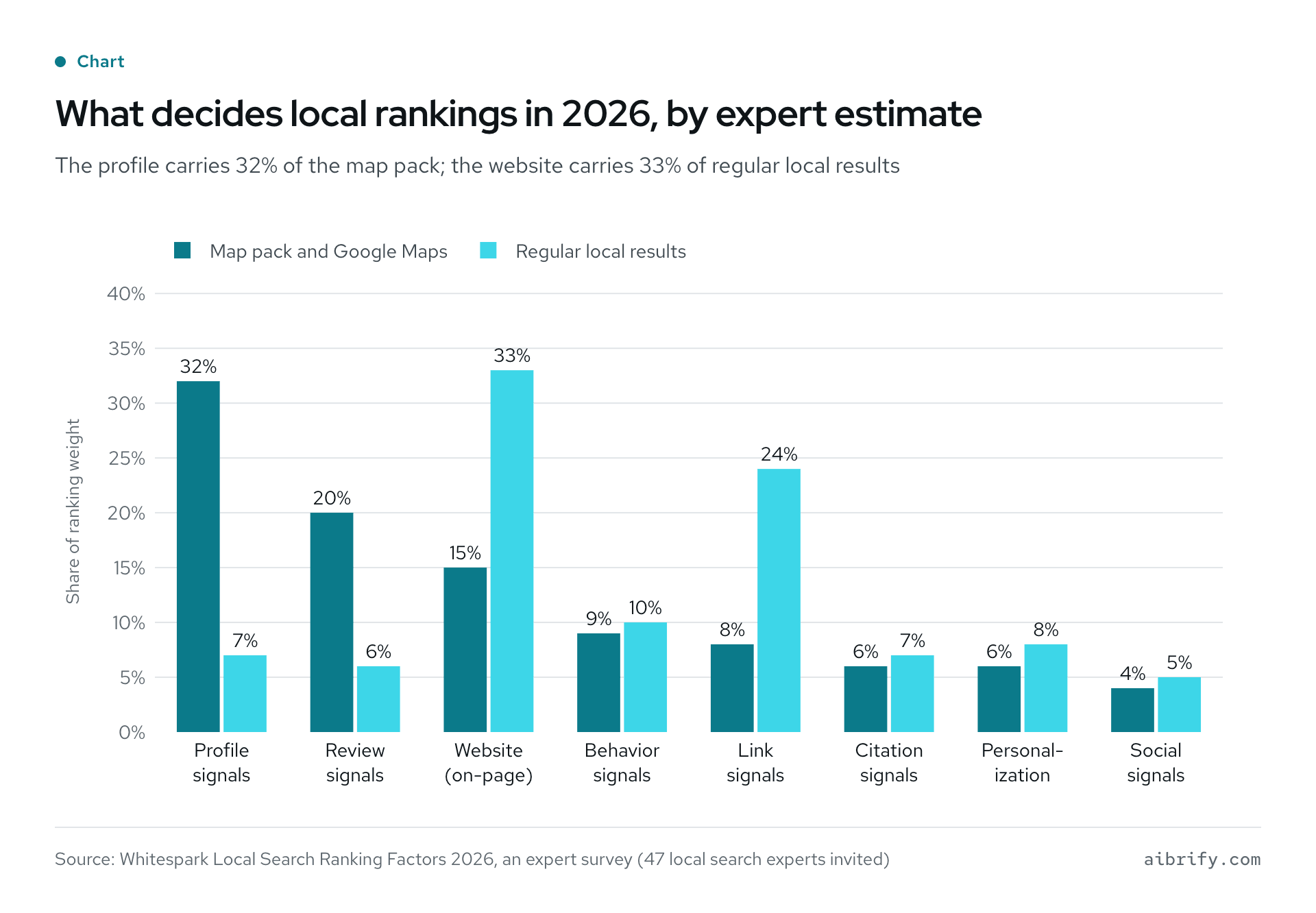
The chart shows each group's share in the two kinds of results; the shares are expert estimates, not numbers Google publishes. The table holds the same figures.
| Factor group | Map pack and Google Maps | Regular local results |
|---|---|---|
| Profile signals | 32% | 7% |
| Review signals | 20% | 6% |
| On-page (website) signals | 15% | 33% |
| Behavioral signals | 9% | 10% |
| Link signals | 8% | 24% |
| Citation signals | 6% | 7% |
| Personalization | 6% | 8% |
| Social signals | 4% | 5% |
Google's own line is that "businesses with complete and accurate info are more likely to show up in local search results". It also says there is no way to pay for a better local ranking (Google).
This matters to Asian-owned businesses in particular. The US Census Bureau counted 684,916 Asian-owned employer firms in 2023, and in its 2022 figures 22.2% of them were in accommodation and food services. Restaurants, clinics and nail salons live on nearby customers, the exact people the map results serve.
Which Businesses Can Have a Google Business Profile?
A business qualifies when it makes in-person contact with customers during its stated hours (Google eligibility). Customers who come to you make it a storefront; going to customers makes it a service-area business; doing both makes it a hybrid (service areas).
Google turns these away:
- online-only businesses that neither receive customers nor visit them;
- virtual offices, meaning a rented mailing address the business does not operate from;
- P.O. boxes and mailboxes at remote locations;
- desks in a co-working space without permanent signage and staff during business hours;
- an ongoing service, class or meeting at a location the business does not own or have the authority to represent.
A home-based business can have a profile as a service-area business with the home address hidden; Google's own example is a plumber working from a residential address (Google guidelines). A profile can list up to 20 service areas, and the whole area should stay within about 2 hours of driving from the base.
A business without permanent on-site signage is not a storefront in Google's eyes and should be listed as a service-area business. Doctors, dentists, lawyers and insurance or real estate agents count as individual practitioners and can have their own profiles; a solo practitioner at a branded office uses the format "Brand: Name".
| Business | How to list it | Watch for |
|---|---|---|
| Restaurant or tea shop | Storefront | The profile name matches the sign over the door |
| Clinic or dental office | Storefront; doctors can add their own profiles | A practitioner profile reads "Clinic name: Doctor name" |
| Nail or hair salon | Storefront | Pick the most specific primary category, such as Nail salon |
| Mobile contractor, tutor or cleaner | Service-area business | Hide the home address; up to 20 service areas |
| Real estate or insurance agent | Individual practitioner | Lead-generation reps for a company are not eligible |
| Online-only store | Not eligible | A website alone can do the job |
What Are the Steps to Set Up a Google Business Profile?
Google documents four steps: go to business.google.com/add, click Add your business to Google, follow the on-screen instructions to add details, and select a verification option (add or claim a profile). The list below adds the preparation and runs in the order most people meet the questions, although the screens can vary.
- Gather the details. The name on the sign, the address or service areas, the phone number, the website and the hours. The phone number must be under the business's direct control, and up to 2 more numbers can be added later (edit your profile).
- Sign in with the owner's own Google account. Not a staff member's, a vendor's or a previous owner's account. Google expects the business owner to own the profile and to add representatives as managers (eligibility and ownership).
- Search for an existing profile first. Search the name at business.google.com/add. If a profile exists and nobody has verified it, choose Claim this business; if someone else has verified it, request access, as described below.
- Enter the name and primary category. Use the name on the sign with no keywords. Choose the most specific primary category, Nail salon rather than Salon, and add up to 9 more categories later (categories).
- Choose storefront or service area. Customers who visit need the storefront address; businesses that travel list service areas and hide the address.
- Add the phone number and website. Add the website if one exists; the field can stay empty until later.
- Verify with the method Google offers. Managing the profile and replying to reviews both wait for verification (reply to reviews).
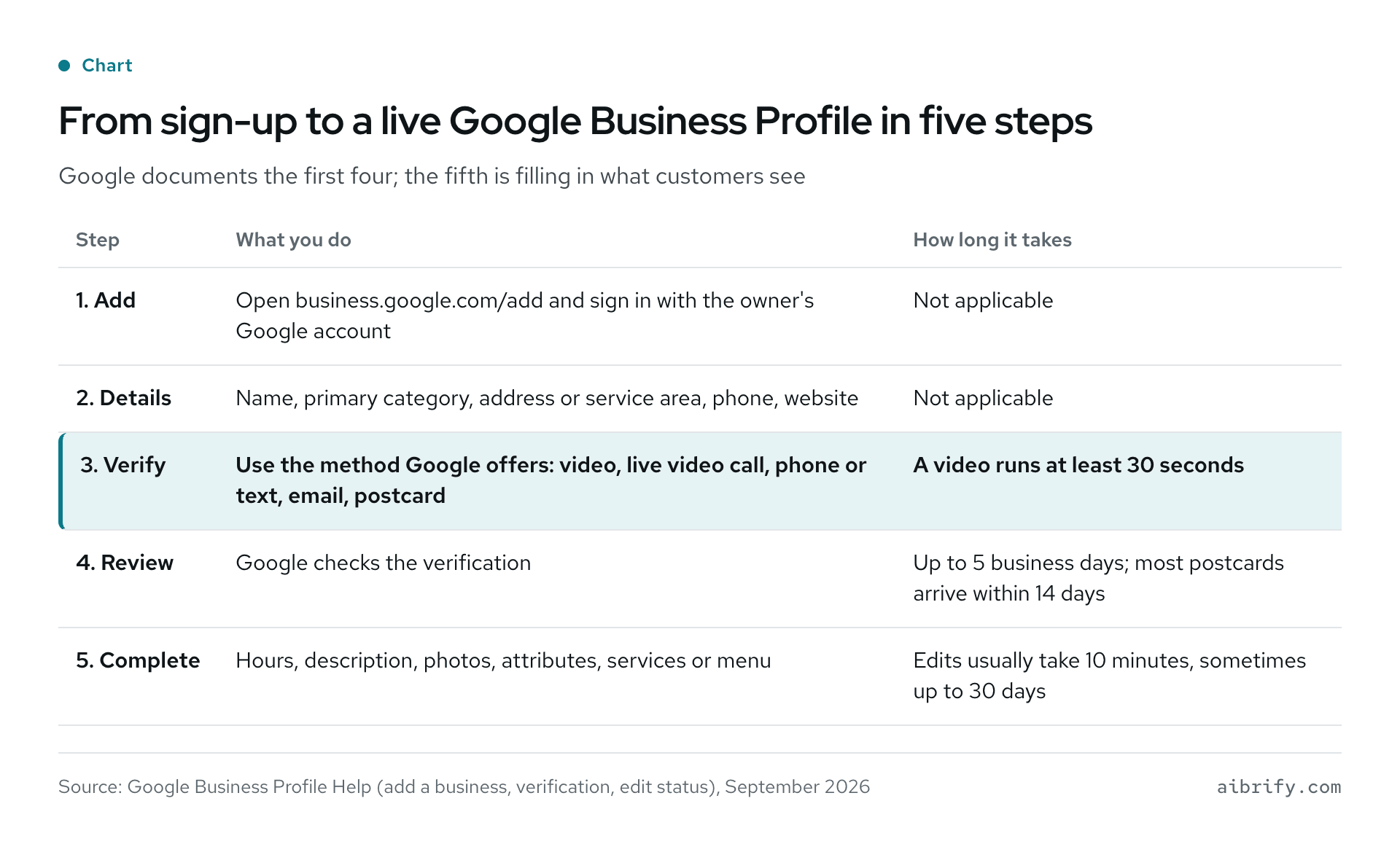
The chart lays out the five steps from sign-up to a live profile, and the table repeats them.
| Step | What you do | How long it takes |
|---|---|---|
| 1. Add | Open business.google.com/add and sign in with the owner's Google account | Not applicable |
| 2. Details | Name, primary category, address or service area, phone, website | Not applicable |
| 3. Verify | Use the method Google offers: video, live video call, phone or text, email, postcard | A video runs at least 30 seconds |
| 4. Review | Google checks the verification | Up to 5 business days; most postcards arrive within 14 days |
| 5. Complete | Hours, description, photos, attributes, services or menu | Edits usually take 10 minutes, sometimes up to 30 days |
Can the Business Name Be in Both Chinese and English?
Not the same name repeated in two languages. Around August 2026 Google added "Repeated Bilingual Names / Script Transliterations" to the name formats it does not allow. The ban holds "even if it appears this way on physical storefront signage" (Google guidelines; Search Engine Roundtable).
So a restaurant whose sign reads "金龙 Golden Dragon" picks one of the two for its profile, the one customers use. The guidelines do not forbid a name written only in Chinese; when most customers search in English, the English name is the better choice.
The name also cannot carry marketing taglines, store codes, hours, phone numbers or URLs, service or product descriptions, or location details that are not part of the name (the same guidelines).
| Name on the profile | Allowed? | Why |
|---|---|---|
| 金龙 Golden Dragon | No | The same name repeated in two languages |
| Golden Dragon Best Dim Sum in LA | No | A tagline and a location added |
| Golden Dragon | Yes | The name on the sign and the one customers use |
| 金龙 | Yes | One script only, which the guidelines do not forbid |
Ranking studies do find that keywords in the business name help on the map: Whitespark's experts put it third among map-pack factors. It is also exactly what the guidelines forbid, and a suspended profile costs far more than the ranking gain. Changing the name after verification can trigger a new verification (edit your profile).
Which Verification Methods Does Google Offer, and How Long Do They Take?
Google lists a video recording, a live video call, phone or text, email, a mailed postcard and, for some businesses, instant verification. Google chooses which methods a business sees, based on its type, public information, region and hours, and the choice cannot be changed. When video is on the list, Google recommends it (verify your business).
| Method | What it involves | Timing |
|---|---|---|
| Video recording | One live, unedited take recorded in the verification flow, at least 30 seconds | Review takes up to 5 business days |
| Live video call | Only during business hours, at the business, showing the location and ownership | Done on the call |
| Phone or text | Enter the code Google sends | Not applicable |
| Enter the code Google sends | Not applicable | |
| Postcard | A code mailed to the address; do not edit the name, address or category while waiting | Most arrive within 14 days; codes expire after 30 days |
| Instant | A website already verified in Google Search Console, or bulk verification for 10 or more locations | Immediate |
Google does not publish how often each method comes up, and the postcard is not offered to every business.
An administrator of the Local Search Forum wrote in December 2025 that they had not seen Google send a verification postcard to a US business in at least two years. The thread was opened because postcards had started to reappear (forum thread). Many guides still present the postcard as the main method, which is out of date.
A business with a website has one more route: Google says it sometimes verifies a profile instantly, and one of the cases is a website already verified in Google Search Console.
What Must a Verification Video Show?
One continuous, unedited, live video of at least 30 seconds that shows three things: where the business is, that it exists, and that the person filming runs it (video verification). The video has to be recorded inside Google's verification flow; a clip recorded earlier cannot be uploaded.
A storefront video needs:
- The location: street signs, the building number and nearby businesses;
- Proof the business exists: the name on a permanent fixture, such as a sign, a wall or a window;
- Proof of management: something only staff can reach, such as opening the cash register, the kitchen or a storage room, or using the point-of-sale system.
A service-area business films street signs or landmarks near its base and its tools and equipment. It can add a business document, such as a permit, an invoice or a utility bill, that matches the name on the profile. Leave out bank, tax and ID numbers, and keep other people's faces out of the frame.
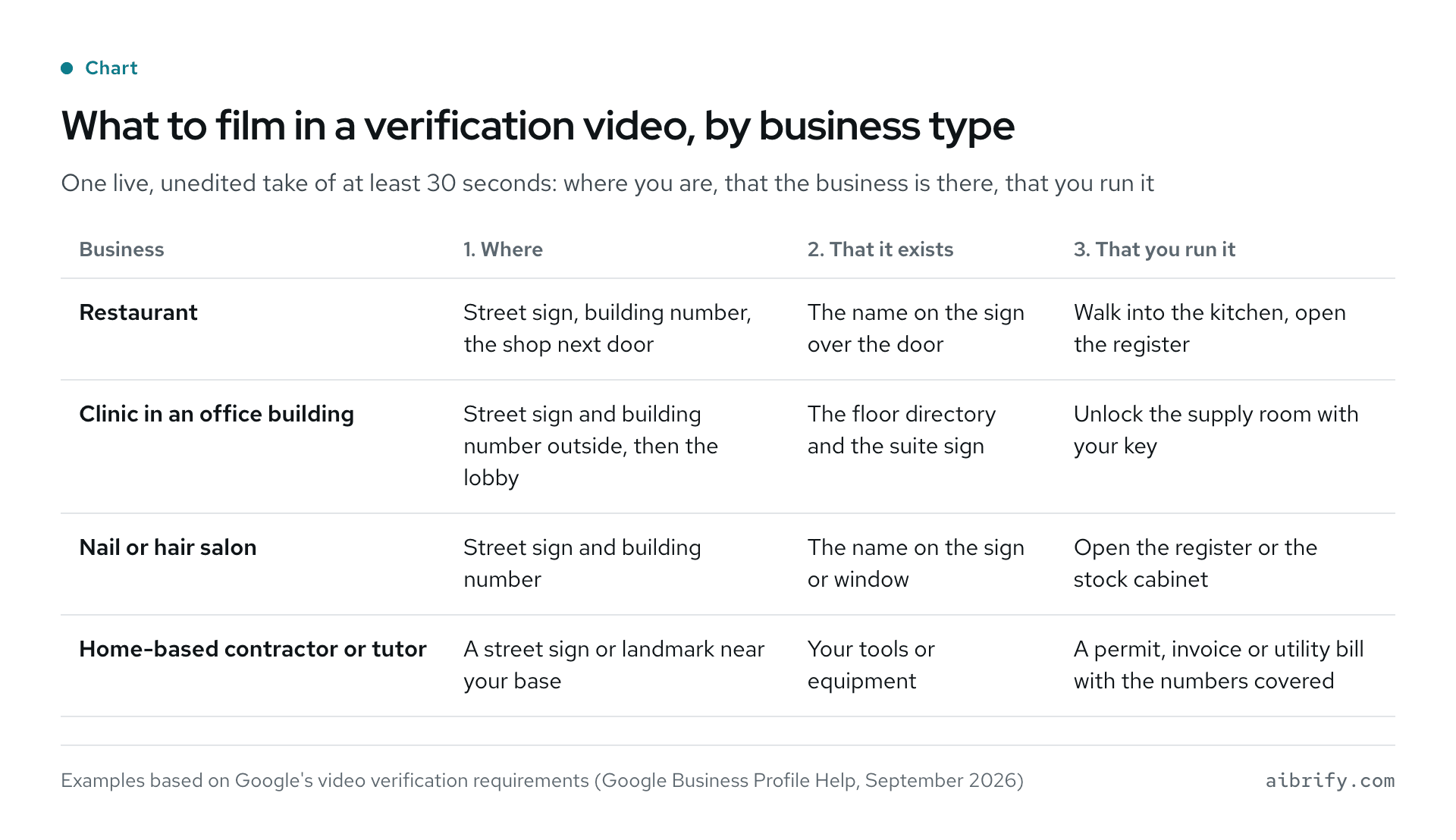
The chart applies Google's video requirements to four common kinds of business, and the table repeats it.
| Business | 1. Where | 2. That it exists | 3. That you run it |
|---|---|---|---|
| Restaurant | Street sign, building number, the shop next door | The name on the sign over the door | Walk into the kitchen, open the register |
| Clinic in an office building | Street sign and building number outside, then the lobby | The floor directory and the suite sign | Open the locked supply room with your key |
| Nail or hair salon | Street sign and building number | The name on the sign or window | Open the register or the stock cabinet |
| Home-based contractor or tutor | A street sign or landmark near your base | Your tools or equipment | A permit, invoice or utility bill with the numbers covered |
The next tips are our advice, not Google's wording. Start filming at the street corner, walk to the door and go in without stopping. For an office on a high floor, start at the street sign outside and keep filming through the lobby, the elevator and the floor directory to the suite door.
Walk the route once before recording and keep the take to a minute or two. Owners on the forum report videos too long to upload after a long route (forum thread).
What If Verification Fails, Stalls or the Profile Is Suspended?
Read the message first, because each one has a different fix.
| What you see | What it means | What to do |
|---|---|---|
| Review issues | The video was not accepted | Record a new video that meets every requirement |
| The Get verified button is back | Google could not complete verification | Verify again, then contact Google support |
| No more ways to verify | Every available method has been used | Contact Google support with documents ready |
| The profile is suspended | Google found a guideline violation | File an appeal with evidence |
| An edit shows as pending | The edit is still under review | Usually 10 minutes, up to 30 days |
Google covers the first two in its verification help; "No more ways to verify" is one of the most common video verification problems (Sterling Sky). Review times for edits are in Google's edit status help.
A suspended profile goes through the Google Business Profile appeals tool, with evidence such as a business registration, a business license, a tax certificate or a utility bill. The evidence has to be uploaded within 60 minutes of filing the appeal, and Google says decisions take up to 5 business days. Do not file twice for the same issue or create a new profile while the appeal is open.
The real wait can be longer: in early 2025, appeal times stretched from about five days to nearly five weeks (Search Engine Journal).
Make changes slowly once the profile is verified. Google says a move requires verifying again, and a new name or category can trigger it too (edit your profile).
One owner on the forum was suspended right after adjusting the hours, and the expert who answered blamed several edits made at the same time (forum thread). Our advice is one change at a time, waiting for each to go live.
A Taiwanese marketing agency notes that Business Profile support has no dedicated agents and corresponds only by email in English (Mianzi). A message like this one, with the brackets filled in, covers what support needs:
Hello, I am the owner of [business name] at [address]. My verification video was not accepted and the profile now shows "No more ways to verify". I can provide our business license and a utility bill. Could you please review the profile? Thank you.
What If Someone Else Already Claimed the Business?
Find the business at business.google.com/add and choose Request access. The current owner gets an email and has 3 days to respond. After 3 days without a reply, the requester may be able to claim the profile, and a denied request can be appealed (request ownership).
Three situations cause most of these: a former vendor built the profile under its own account, a former employee did, or a business bought from its previous owner still carries that owner's profile.
The prevention is to make the owner's own account the primary owner from day one and add staff and vendors as managers. Managers can do almost everything except add or remove users and remove the profile (users and access). A new owner or manager waits 7 days before managing some features, and transferring primary ownership needs another owner or manager on the profile first.
What Should You Fill In After Verification?
Everything a customer sees on the map: hours, description, photos, attributes, services or menu, and booking links. The rules below come from Google's help on hours, special hours, attributes, menus, photos and videos, posts and links.
| Field | Rule | Advice |
|---|---|---|
| Hours | A lunch break goes in as two entries; delivery or takeout hours can be set separately | Set special hours before holidays; mark the business temporarily closed for closures of 7 days or more |
| Description | Up to 750 characters; no links, and not focused on promotions or prices | Say what the business does, where it serves and which languages it speaks |
| Attributes | US businesses can add Asian-owned, available since August 2022 | Tick only what is true |
| Services, menu, products | The menu editor is for food and drink businesses and takes a photo or a PDF | Match the menu and prices in the shop |
| Photos | JPG or PNG, 10 KB to 5 MB, 720 by 720 pixels recommended | A few each of the front, the inside and signature dishes or work |
| Video | Up to 30 seconds and 75 MB | Show the inside of the business |
| Posts | Updates, offers and events; archived after 6 months | One or two a month |
| Booking links | Appointment, reservation, food order and shopping links | Link the business's own booking or ordering page |
The Asian-owned attribute launched in August 2022 (Google blog). Google's guidelines say nothing about the language of the description.
Two features are gone, although many guides still describe them. Chat and call history ended on July 31, 2024 (Google), and the free websites Google generated from profiles were shut down in 2024 (Search Engine Journal).
The social links on a profile cover Facebook, Instagram, LinkedIn, Pinterest, TikTok, X and YouTube, and WeChat is not among them (social links). If the phone on the profile often goes unanswered, see a receptionist that answers in English and Mandarin.
How Do You Ask for Google Reviews Without Breaking the Rules?
Use Google's review link or QR code, ask every customer the same way, and offer nothing in return. The link is under Read reviews, then Get more reviews, and the QR code can only be generated in a computer browser for now (ask for reviews).
Google prohibits these (prohibited content):
- discounts, free items or money in exchange for a review, or for removing a negative one;
- asking only happy customers, or discouraging negative reviews;
- pressuring customers to review on the premises, or telling them what to write;
- review quotas for staff, or asking customers to name a staff member.
The FTC's rule on fake reviews took effect on October 21, 2024, banning fake reviews, buying or selling reviews and review suppression (Federal Register). Its December 2025 warning letters put civil penalties at up to $53,088 per violation (FTC).
The FTC rule does not ban every incentive, as long as nothing requires a positive review (FTC Q&A); Google's policy is stricter and allows none.
Google enforces it at scale: in 2025 it blocked or removed more than 292 million policy-violating reviews and removed more than 13 million fake Business Profiles (Google). A business caught with fake reviews can be blocked from new reviews for a period, see existing reviews unpublished and carry a warning to customers on its profile (restrictions). Paying someone to post five-star reviews or to remove bad ones puts the profile itself at risk.
Replying to reviews requires a verified profile, and 89% of consumers in BrightLocal's survey expect a response to their reviews. Answer in the language the review was written in, and keep it conversational rather than promotional, as Google advises (reply tips).
A fake one-star review that leaves a WhatsApp number and demands money to remove it goes to Google's review extortion report form, without contacting the sender.
Can You Trust a Call That Says It Is From Google?
Usually not. Google says it will never ask for payment information over the phone or guarantee a special spot in its products (Google).
A common robocall says "Press one now so that we can verify your Google My Business listing". California was among the most targeted states in the calls YouMail recorded in 2025 (YouMail).
Three rules cover it:
- setting up and managing a Google Business Profile is free;
- a verification code goes only into Google's own pages, never to a caller;
- changes to the profile are made by signing in at business.google.com.
Do You Need a Website as Well as a Google Business Profile?
Yes, because they win different results. The profile decides the map and the local pack; the website decides the regular results below them. There, Whitespark's experts give on-page and link signals 57% of the weight and the profile 7%.
A website also holds what a profile cannot: a WeChat QR code, a full menu in English and Chinese, and booking or ordering pages. Google's free profile websites are gone, so that content needs a website the business owns, and a site verified in Search Console can make the profile eligible for instant verification.
| Compared | Google Business Profile | Your own website |
|---|---|---|
| Cost | Free | Aibrify builds from $390, hosting $5 a month |
| Main effect | The map and the local pack | Regular search results |
| WeChat QR code | Not possible | Yes |
| English and Chinese menu | Menu editor for food and drink businesses only | As much as you like |
| Owned by | The owner's Google account | The owner |
Aibrify sets up the Google Business Profile with every website it builds. The owner's account stays the owner; as a manager, Aibrify fills in the profile, writes the description, uploads the photos and guides the owner through the verification video. Websites start at $390 with hosting at $5 a month, at a fixed price agreed in writing before work starts; the details are on the website plans page.
Frequently Asked Questions (FAQ)
Does a Google Business Profile cost anything?
No. Google says creating a Business Profile and listing a business on Google is free. A caller charging a fee to "verify" a listing or to guarantee a ranking is not Google, and Google never asks for payment information over the phone.
How long does Google Business Profile verification take?
A video verification review takes up to 5 business days. Most postcards arrive within 14 days, and postcard codes expire after 30 days. Edits made after verification usually go live in 10 minutes, and some take up to 30 days.
Can a home-based business have a Google Business Profile?
Yes, as a service-area business with the home address hidden. A profile can list up to 20 service areas within about 2 hours of driving. Online-only businesses that never meet customers in person are not eligible.
Can the verification video be recorded in advance and uploaded?
No. Google requires the video to be recorded live inside the verification flow, as one unedited take of at least 30 seconds, and pre-recorded videos are not accepted. Walk the route first: street sign, building number, sign with the name, then a staff-only area.
Can the business name show both the Chinese and the English name?
No. Since 2026, Google's guidelines forbid repeating the same business name in more than one language or script, even when the storefront sign shows both. Pick the name customers use most, with no keywords, city names or taglines.
Can a Google Business Profile be managed in Chinese?
Yes. The profile's interface follows the Google Account language, so switching the account to Chinese switches the screens, and Google's help center has a Chinese edition called "Google 商家资料". Support email, by one agency's account, is in English only.
Can a business offer a discount in exchange for a Google review?
No. Google prohibits any incentive for a review and prohibits asking only satisfied customers. A business caught doing it can lose new reviews for a period, see existing reviews unpublished and carry a public warning on its profile.
What is the difference between a Google Business Profile and a website?
A Google Business Profile is a free listing on Google Maps and Search, and it mainly drives map results. A website is the business's own page; it mainly drives regular search results and can hold a WeChat QR code and a full menu. Whitespark's 2026 experts give profile signals 32% of map results and on-page signals 33% of regular local results.
What Should You Do Next?
Three things to do today:
- search for the business while signed in to the owner's own Google account, to see whether a profile exists and who holds it;
- check the name against the table above, so it uses one script only;
- walk the route for the verification video with the shot list in hand.
To hand the website and the profile to someone else, text or email Aibrify the business name, the address and what the site should do. A reply comes within one business hour, then a written scope with a fixed price. The website and the Google Business Profile start at $390 with hosting at $5 a month; start with a short brief, and the plan details are on the website plans page.


