What Should a Small Law Firm Automate First?
Automate the four jobs that eat staff hours but need no legal judgment. They are the first reply to a new inquiry, deadline and court-date reminders, an intake form that fills documents, and routine client status updates. At fixed prices, the reminders are a $100 automation, the intake tool is $300, and a client portal with logins starts at $5,000.
Each one reads a tool the firm already has, a form, a calendar or a spreadsheet, and sends a text, email or WeChat message. Nothing in the list gives advice, files anything or decides whether to take a matter. Those stay with the lawyer, and the ethics guidance below says they must.
The hours are there to recover. In the Thomson Reuters Institute's 2022 survey of 400 small-firm lawyers, 80% called time lost to administrative tasks at least a moderate challenge. The same lawyers spent 56% of their time practicing law, and 82% said they were not addressing the problem.
The 2023 edition of that survey put practice time back at 61%, with administrative work still the top challenge. That still leaves nearly two of every five hours outside legal work. Whether a firm calls this workflow automation for law firms or just clearing desks, the order of attack below is the same.
Where Does a Small Law Firm Lose Time?
A small firm loses time in four places. The inquiry nobody answers, the follow-up nobody sends, the deadline tracked in someone's head, and the client who has to call for news. None of the four is legal work, and all four have been measured.
Intake: the inquiry nobody answers
Clio has run the same secret-shopper test twice. In 2019 it emailed 1,000 law firms and called 500 of them, posing as prospective clients. Only 40% replied to the email, while 56% of calls were answered by a person and 39% went to voicemail.
More than half of those voicemails were still unreturned after 72 hours. The same report surveyed 2,000 consumers, and 82% named timeliness of response as the most important factor when choosing a lawyer.
The 2024 repeat was worse. 67% of firms did not respond to the email, and 48% either did not answer the phone or never called back. Among firms that did reply, only 2% referred to a similar legal situation, down from 27% in 2019.
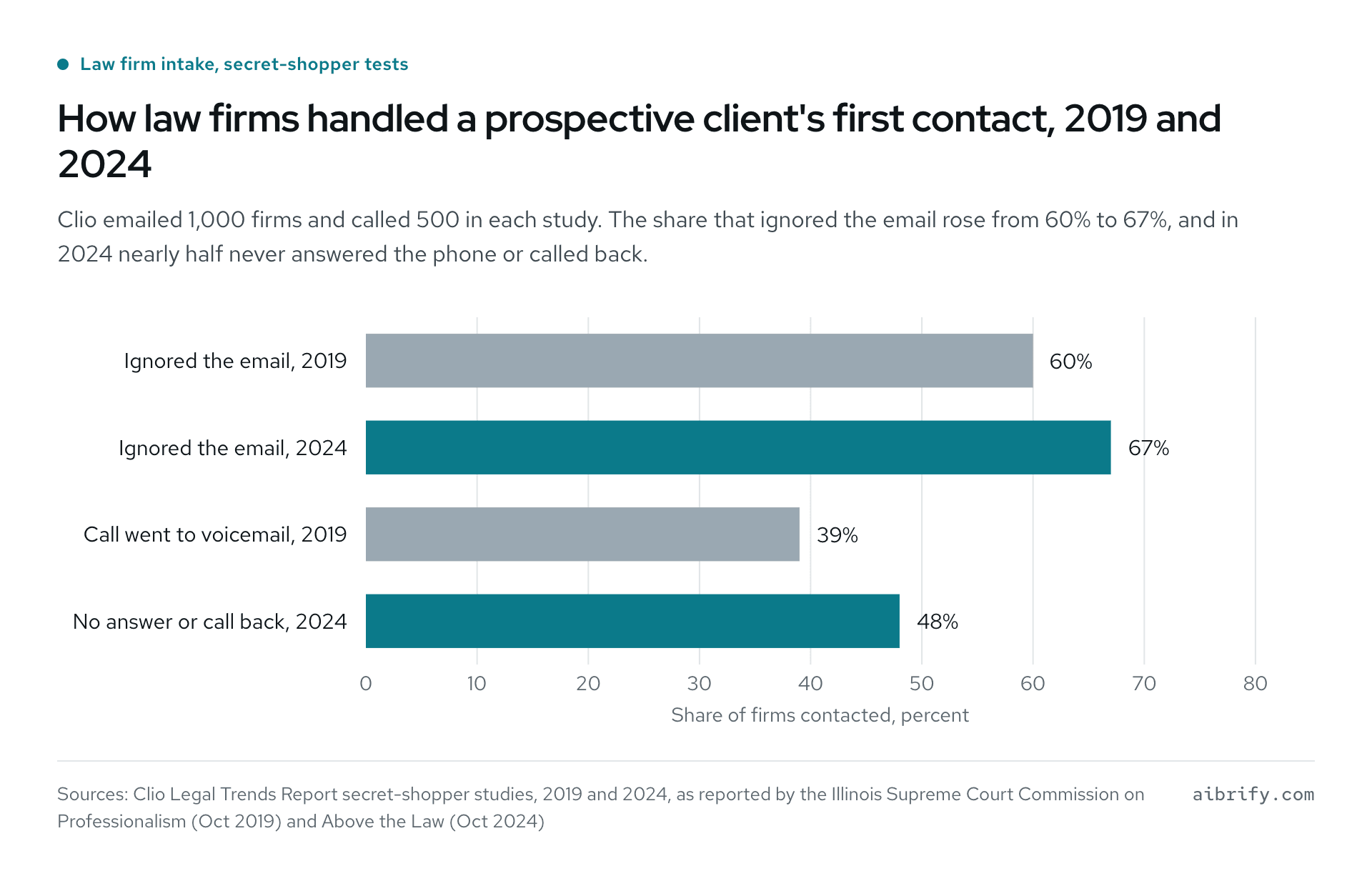
The chart shows Clio's secret-shopper results; the table repeats them.
| Measure | 2019 | 2024 |
|---|---|---|
| Did not reply to the prospective client's email | 60% (40% replied) | 67% |
| Call went to voicemail | 39% | Not reported separately |
| No answer, or no call back | Not reported as one figure | 48% |
| Reply referred to a similar legal situation | 27% | 2% |
Deadlines: the date in someone's head
Missed deadlines are the classic malpractice claim, and the numbers back the reputation. The ABA's Standing Committee on Lawyers' Professional Liability found that administrative errors, a category that includes calendaring, caused 19% of claims from 2016 to 2019. At Wisconsin Lawyers Mutual, two calendar errors together made up 20% of all claims reported between 2010 and 2020.
Small firms carry most of that risk. A Washington State Bar summary of the same ABA profile notes that solos and small firms make up over half of claims by frequency. It adds that over one-third of claims came from administrative errors or client relations, not from substantive legal mistakes.
Status calls: the client who has to ask
California's Rule 1.4 requires a lawyer to keep the client "reasonably informed about significant developments" and to comply promptly with reasonable requests for information. Most states track the ABA model rule in similar words.
What Does Law Firm Intake Automation Look Like?
Law firm intake automation has three layers. A reply goes out the minute an inquiry arrives, a form collects the facts and produces the documents, and the phone gets answered. The first is a $100 automation, the second a $300 tool, and the third an AI receptionist at $179 a month.
The first reply within a minute ($100)
When a web form, an email or a text comes in, the automation answers with three things. It confirms that a person will call back, gives a window for that call, and lists the documents to gather. It also logs the inquiry to the firm's intake sheet and nudges the responsible person if nothing has happened by a set time.
That is the whole job, which is why it costs $100 and ships within three days. The reply stays out of the matter itself: no view on the case, no fee beyond what the firm publishes, no deadline advice. A missed call can trigger the same reply by text; see missed call text back for that variant.
"We received your message and an attorney will call you by 3 pm tomorrow" is enough. It is the sentence 67% of firms in the 2024 test never sent.
The intake form that fills the documents ($300)
A $300 intake tool is a page with the firm's questions, branching by practice area, that produces filled PDFs at the end. Typical outputs are an intake summary, a conflict-check sheet and a draft engagement letter. The client fills it on a phone, the firm receives the PDFs and the structured data, and nobody retypes anything.
The output is a draft for a lawyer to review, not a finished legal document. That distinction matters under the ethics rules discussed later, and it is why the tool costs $300 rather than a document-automation subscription. What a $300 tool looks like walks through the general pattern.
The phone: an AI receptionist that books and takes messages
The phone is where small firms lose the most, and the 2024 figures above show why. Aibrify Desk answers in English, Mandarin or Spanish, books consultations into its own calendar, and answers questions from the firm's material. It takes messages and transfers to a person when it is unsure.
Every call opens by saying it is an AI assistant, and calls are transcribed with no audio kept. Desk costs $179 a month with 400 minutes included and $0.30 per extra minute, month to month, setup included.
Desk never answers "do I have a case" and never quotes a fee the firm has not listed. The guide to an AI receptionist for law firms lists what it answers and what it passes to a lawyer.
Clients are more open to this than lawyers assume. In Clio's 2024 study, only 7% of firms used a chatbot. Yet 61% of clients said they would engage with one if a human would eventually be available.
How Do Deadline and Court-Date Reminders Work as an Automation?
A deadline reminder automation reads the dates the firm already tracks in a docketing system, a shared calendar or a spreadsheet. It sends reminders on a schedule the firm sets, typically 30, 14, 7 and 1 days before, plus the morning of. Messages go to the responsible attorney and paralegal by text or email, and to the client when the firm chooses.
A client-facing reminder is plain, for example "Your hearing is Tuesday, March 3, at 9 am, Department 12" and nothing more. It is a $100 job, and setup takes two to three days, like the other automations for $100.
Three design rules keep it safe:
- The docket stays the calendar of record. The automation reads it; it does not replace it.
- Computing the deadline stays with the lawyer. Court rules, service methods and holidays change the math, and that is legal judgment.
- Every reminder asks for a one-tap acknowledgment. An unacknowledged reminder escalates to a second person the same day.
California's Rule 1.1 comment says competence includes keeping abreast of "the benefits and risks associated with relevant technology". A reminder layer on top of the docket is the cheapest way to act on that duty for the error type insurers see most. The Wisconsin insurer quoted above calls a reliable calendaring system "imperative to avoiding missed deadlines".
What Is Document Automation for Law Firms, and What Does It Cost?
Document automation for law firms is software that takes answers from a form or a case record and assembles documents from templates. Engagement letters, pleadings, discovery responses and closing documents are the usual targets.
In October 2026 the dedicated tools run from $83 to $290 a month. Practice-management suites include a version at their middle tiers, and a one-off intake-to-PDF tool is $300.
| Option (as of October 2026) | Price | What it covers |
|---|---|---|
| Gavel Lite | $83 a month, 10 templates | Word and PDF automation, 1 builder seat |
| Gavel Pro | $290 a month, 100 templates | Template library, payments, custom domain |
| Gavel Scale | From $417 a month, billed annually | Custom limits, API access, account manager |
| MyCase Pro | $100 per user a month, annual billing | Document generation, intake forms, two-way texting |
| PracticePanther Solo | $49 per user a month, annual billing | Document templates on every plan |
| Aibrify intake form to PDF | $300 once | The firm's own form, branching, filled PDFs |
Volume decides: a firm that produces the same twelve documents all day gets its money's worth from a template engine with clause logic. A firm that needs its intake summary, engagement letter and one standard form filled correctly can own a $300 tool instead.
Either way the lawyer reviews the output. In the ABA's 2020 to 2023 claims profile, preparing, filing and transmitting documents was the top activity behind malpractice claims, ahead of commencing an action. Automation removes the retyping; it does not remove the review.
How Do Client Status Updates Get Automated Without Breaking Confidentiality?
Automated status updates work when they carry stage and date information, not substance. A text saying "your documents were filed today; the next date is March 3" meets the duty to keep the client informed. A text saying what the filing argued, or what the other side may do, is legal communication and stays with the lawyer.
Three ways to do it, by price:
- A stage-change text ($100). When the stage field changes in the firm's case list or spreadsheet, the client gets a short message in the language they chose. The firm writes the message for each stage once, and a lawyer approves the set.
- An upload portal for client documents ($1,000). Clients log in, upload what the firm asked for, and see a checklist of what is still missing. The same building block serves accounting firms, and it ends the "did you get my documents" call.
- A client status portal ($5,000 and up). Several roles, matter stages, documents, messages and payments in one place, scoped with the firm before the price is fixed.
Confidentiality is the constraint on all three. California's Rule 1.6 says a lawyer "shall not reveal information protected from disclosure" under section 6068(e)(1) without informed consent. For many matters the client's phone number and the fact of representation sit inside that circle.
So the automation sends only what the client agreed to receive, over the channel the client chose, from accounts the firm controls. That is where ownership matters. With a fixed-price build the firm owns the code, the repository and the accounts, so client data never sits in a vendor's shared database.
The developer is inside the ethics rules too. California's Rule 5.3 covers a nonlawyer whom a lawyer supervises "whether or not an employee of the same law firm". The lawyer must make reasonable efforts to keep that person's conduct compatible with the lawyer's obligations, and the comment names independent contractors.
What Do the Ethics Rules Say About AI Automation for Law Firms?
The rules do not forbid AI automation for law firms; they forbid letting software practice law or leak client information. The State Bar of California's 2026 Practical Guidance puts the line in one sentence. Lawyers "must not deploy agentic systems in a manner that allows the system to make substantive legal determinations, communicate legal advice, prepare and file pleadings".
The same passage requires meaningful lawyer supervision and review of whatever the system does. The guidance also bars autonomous external transmission of client information, "including automated communications, filings, or data transfers," without safeguards and human review.
On confidentiality the California guidance is direct. A lawyer "must not input any confidential information of the client into a generative AI solution that may present material risks to confidentiality or security". Informed client consent is the only exception it allows.
ABA Formal Opinion 512 (July 2024) goes further for self-learning tools. It says "a client's informed consent is required prior to inputting information relating to the representation into such a GAI tool". It adds that boilerplate language in an engagement letter purporting to authorize that use "is not sufficient".
Fees follow the same logic. Hourly billing "must reflect the time actually spent on the client's matter", and the guidance treats general software subscriptions as overhead, not a billable cost. Opinion 512 adds that a lawyer may not bill a client for time spent learning a tool the lawyer will use regularly.
The practical checklist that falls out of all this:
- No legal advice, case assessments or fee negotiation from software, ever.
- Messages to clients and courts come from lawyer-approved templates, never from generated text.
- Confidential facts stay in firm-controlled accounts and never enter self-learning tools without informed consent.
- A person reviews every document before it leaves the firm.
- Clients hear what is automated and what is not.
That last point has numbers behind it from Clio's 2025 survey of over 1,700 legal professionals and 1,000 consumers. It found 78% of clients wanted lawyers to disclose AI use, while 35% of legal professionals rarely or never did. The same survey found 36% of clients less likely to trust a lawyer who uses AI, and 56% would prefer a paralegal to AI.
What Does Law Practice Software Cost, and Where Does a Fixed-Price Build Fit?
Practice-management suites charge per user per month and bundle intake, documents and texting into their middle tiers. As of October 2026, MyCase is $50, $100 and $130 per user a month on annual billing, or $60, $120 and $150 monthly. Intake forms, document generation and two-way texting start at the $100 Pro tier.
PracticePanther runs $49 to $114 per user monthly when billed annually, with intake forms and texting from the $89 Business tier. Intake-specific platforms such as Lawmatics show no prices; every plan reads "Get a demo" or "Contact Sales," so the price is on request.
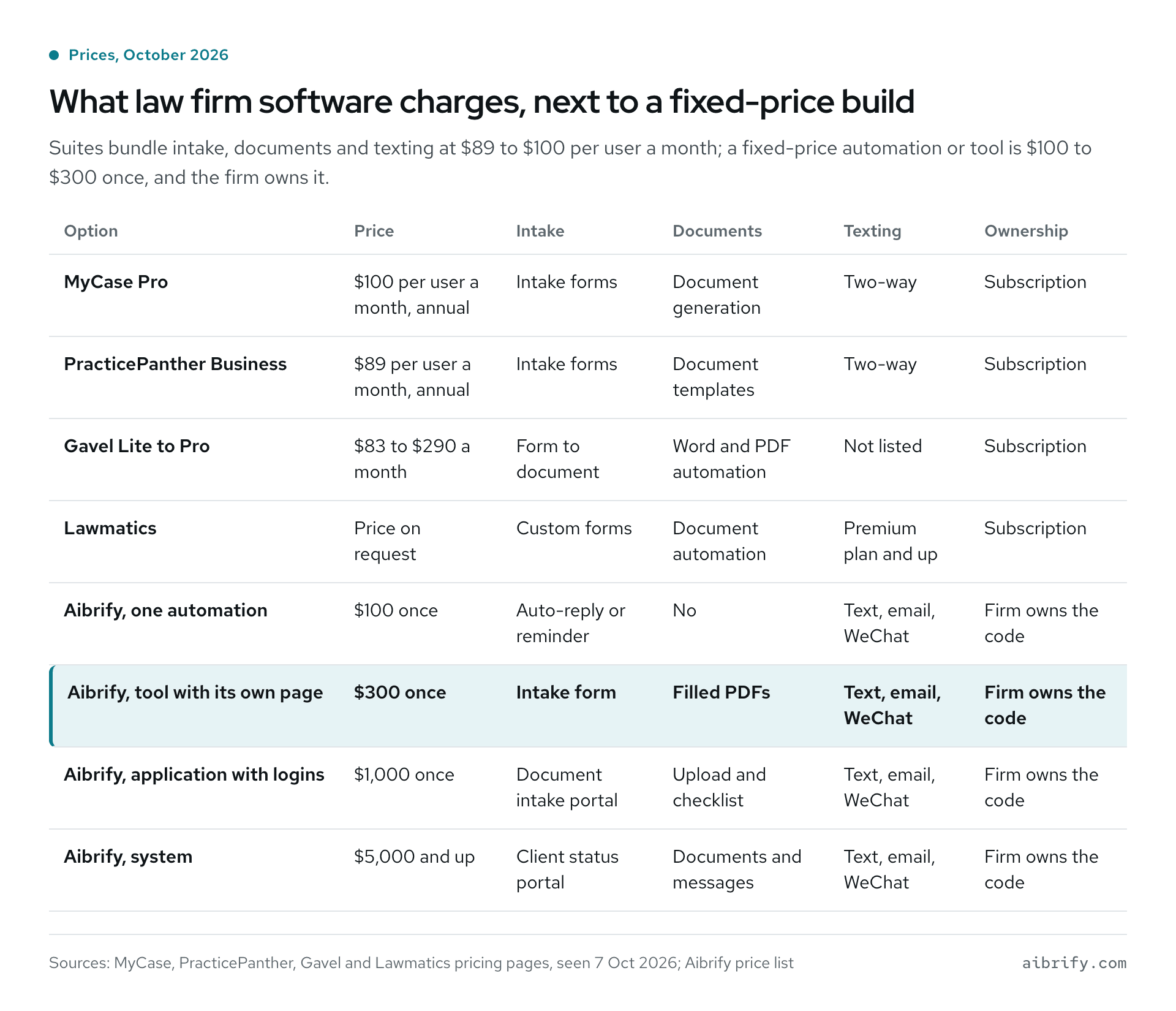
The table compares subscription prices with the fixed-price ladder.
| Option | Price (October 2026) | Intake | Documents | Texting | Ownership |
|---|---|---|---|---|---|
| MyCase Pro | $100 per user a month, annual | Intake forms | Document generation | Two-way | Subscription |
| PracticePanther Business | $89 per user a month, annual | Intake forms | Document templates | Two-way | Subscription |
| Gavel Lite to Pro | $83 to $290 a month | Form to document | Word and PDF automation | Not listed | Subscription |
| Lawmatics | Price on request | Custom forms | Document automation | Premium plan and up | Subscription |
| Aibrify, one automation | $100 once | Auto-reply or reminder | No | Text, email, WeChat | Firm owns the code |
| Aibrify, tool with its own page | $300 once | Intake form | Filled PDFs | Text, email, WeChat | Firm owns the code |
| Aibrify, application with logins | $1,000 once | Document intake portal | Upload and checklist | Text, email, WeChat | Firm owns the code |
| Aibrify, system | $5,000 and up | Client status portal | Documents and messages | Text, email, WeChat | Firm owns the code |
A fixed-price build fits three situations:
- The firm already pays for a suite and needs one thing it does not do.
- The firm is too small to justify per-user fees for intake alone.
- The firm wants client data in accounts it controls.
The two approaches are not rivals. An automation can read the suite's calendar or intake export and do the step the suite leaves to a person.
The direction of travel is clear. Clio's 2025 Legal Trends Report, drawing on the same surveys, found 79% of legal professionals now use AI in some form. Growing firms in its data use time-saving automations twice as much as stable firms and nearly three times as much as shrinking ones.
Those are correlations inside one vendor's customer base, not proof of cause, but the gap is large.
What Does a Payback Estimate Look Like With Your Own Numbers?
Use your own counts and the BLS median wages, not anyone's "hours saved" claim. In May 2025 the median lawyer earned $159,670 a year, or $76.76 an hour; paralegals earned $62,890, or $30.24 an hour. Legal secretaries and administrative assistants earned $55,570 a year, about $26.72 an hour across a 2,080-hour year.
| Task | Minutes each time | Times a month | Who does it | Monthly cost at the BLS median |
|---|---|---|---|---|
| Reply to a new inquiry and log it | 10 | 25 | Legal secretary, $26.72 an hour | $111 |
| Chase a voicemail or email lead | 8 | 25 | Paralegal, $30.24 an hour | $101 |
| Check and remind on upcoming dates | 20 | 22 working days | Paralegal, $30.24 an hour | $222 |
| Answer "what is happening" calls | 6 | 40 | Lawyer, $76.76 an hour | $307 |
The minutes and counts are placeholders; replace them with your own. Under those inputs, the four rows cost about $741 a month in staff time at median wages. A $100 reminder automation and a $100 auto-reply would pay back within the first month, and the $300 intake page within the first quarter.
Halve every count and the arithmetic still closes inside a year.
What Does Aibrify Charge for Law Firm Automation?
Aibrify is a software company in Los Angeles that builds automations and custom software for small businesses at fixed prices. Every price is quoted in writing before work starts, and for law firms the first projects usually land like this:
- $100, one automation. Court-date and deadline reminders from the firm's calendar or spreadsheet, or an auto-reply and follow-up for new inquiries. Usually ships in 2 to 3 days.
- $300, one tool with its own page. An intake form, branching by practice area, that ends in filled PDFs. About a week.
- $1,000, an application with logins. A document intake portal where clients upload requested files and see what is missing. 2 to 3 weeks.
- $5,000 and up, a system. A status portal for clients with several roles, documents, messages and integrations, scoped together first and then priced.
Every job has a written scope and a fixed price, and the firm checks the work on a phone as it comes together. From delivery, code, repository and accounts all belong to the firm. Hosting with Aibrify is optional at $10 to $30 a month, or take it anywhere.
Anything broken in the delivered scope is fixed free for 90 days. After that, changes are quoted at the same fixed prices, or a Care plan covers them. Care is $49 a month (1 hour of changes, reply in 2 business days) or $149 a month (4 hours, next business day).
For the phone, Aibrify Desk adds $179 a month for 400 minutes of answered calls in English, Mandarin and Spanish. To start, send a short brief with four questions, or write by text, email or WeChat. The reply comes within 1 business hour, with no sales call and no meeting required.
The automation service page carries the full price list, and how to write a software brief shows what to put in yours.
Frequently Asked Questions
What is automation for law firms?
Automation for law firms means software that watches for an event and performs one defined task in response. Typical events are a new inquiry, an approaching court date or a change in a matter's stage. Typical tasks are a reply, a reminder, a status text or a filled document, while legal judgment, advice and review stay with the lawyer.
What should a small law firm automate first?
Start with the auto-reply to new inquiries and with deadline reminders. Both cost $100 as fixed-price automations, carry no legal judgment, and address the two failures studies measure most: unanswered prospective clients and calendaring errors. A $300 intake page that outputs filled PDFs is the usual third step.
How much does law firm automation cost in 2026?
Suites bill per user each month, roughly $49 to $150 in October 2026, with intake and document features in their middle tiers. Dedicated document automation runs about $83 to $417 a month. A fixed-price build is $100 for one automation, $300 for an intake tool, $1,000 for an app with logins, $5,000 and up for a portal.
Can automation software give legal advice or discuss a client's case?
No: California's 2026 generative AI guidance and the ABA's 2024 opinion place legal determinations, legal advice and court filings under a lawyer's supervision and review. A well-designed automation sends lawyer-approved template messages with stage names and dates, confirms receipt and books calls. Any question about the merits of a case goes to a person.
Is it safe to put client information into an automation?
It depends on where the data lives and who can see it. California's guidance bars putting confidential client information into generative AI tools that present material confidentiality or security risks, absent informed client consent. An automation that runs in accounts under the firm's control, sends only messages the client opted into and avoids self-learning tools fits the rules.
What does document automation for law firms cost?
In October 2026, Gavel lists plans from $83 monthly for 10 templates up to $290 monthly for 100 templates. Its Scale tier starts at $417 a month billed annually, and practice-management suites such as MyCase and PracticePanther include document templates in per-user plans. A single intake page that fills PDFs is a $300 fixed-price tool the firm owns outright.
Do deadline reminders replace a docketing system?
No, a reminder automation is a second layer, not a replacement. It reads dates in the firm's docketing system, calendar or spreadsheet and sends texts or emails on a set schedule, with escalation when nobody acknowledges. Calculating the deadline under court rules remains the lawyer's job, and the firm's docket stays authoritative.
Does Aibrify Desk handle law firm calls in Spanish or Mandarin?
Yes, Desk speaks English, Spanish and Mandarin, but not Cantonese. Callers hear up front that an AI assistant is on the line, the conversation is transcribed, and no audio is stored. It books consultations, answers from firm-supplied material, takes a message or hands the call to a person, for $179 a month including 400 minutes.