What Should an Accounting Firm Automate First?
Start with the three jobs that eat the most staff hours in a small firm: deadline reminders, document collection and status calls. At Aibrify's fixed prices, deadline reminders cost $100 and a document intake portal with client logins costs $1,000. A client status portal with several roles starts at $5,000, and the full list is on the automation service page.
The order matters. Reminders ship in two or three days and cut the first wave of "did you get my stuff?" calls. The intake portal takes two to three weeks and replaces the email chase; the status portal is for firms with hundreds of returns in flight.
The pressure behind all three is measurable. The IRS had received 142.2 million individual returns by April 24, 2026, and tax professionals e-filed 73.9 million of them. In the AICPA's 2026 survey of 629 practitioners, managing tax law complexity was the top current issue for solo practitioners and two-to-ten-person firms.
None of the automation below touches that complexity. It works on the clerical layer around the return: due dates, missing documents and callbacks, while the CPA keeps the judgment and the signature.
Where Does a Small Accounting Firm Lose Time?
Small firms lose time in three places: the four weeks around April 15, the chase for client documents, and calls asking where a return stands. None of the three needs a CPA's judgment. All three can be handled by software that reads a list and sends a message.
The seasonal crunch, in IRS numbers
The IRS weekly statistics show how compressed the season is. Through March 27, 2026, the IRS had received 88.4 million individual returns, 45.9 million of them e-filed by tax professionals. By April 24, 2026, those figures had reached 142.2 million and 73.9 million.
The gap between the two dates is the crunch. Subtracting the IRS tables, 53.8 million returns, 38% of the season's total, arrived in those four weeks. Tax professionals sent 28.0 million of their 73.9 million e-filed returns in the same window, also 38%.
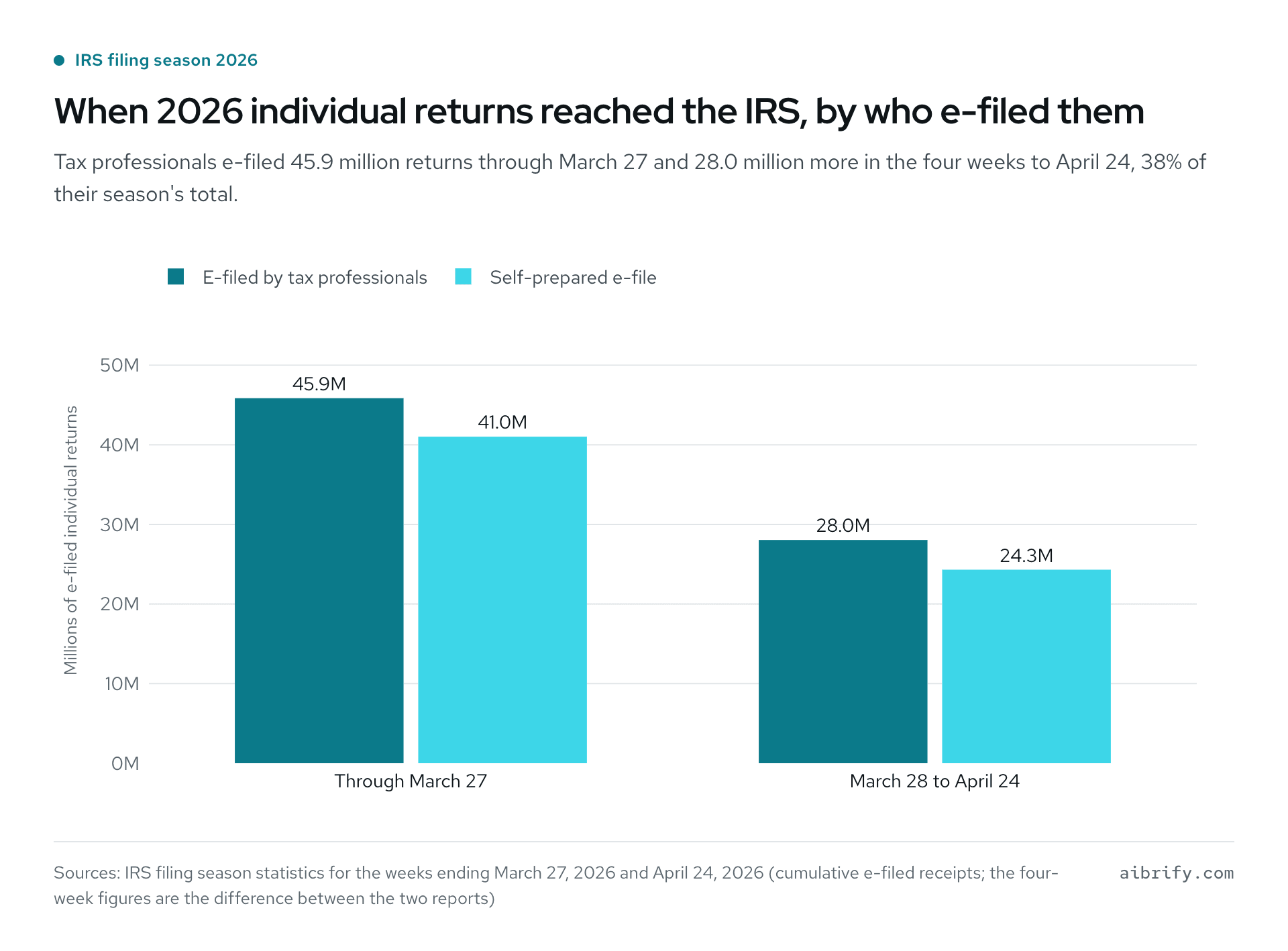
The chart shows that split in millions.
| Period in 2026 | E-filed by tax professionals | Self-prepared e-file |
|---|---|---|
| Through March 27 | 45.9 million | 41.0 million |
| March 28 to April 24 | 28.0 million | 24.3 million |
| Season total by April 24 | 73.9 million | 65.3 million |
The document chase
A Canopy survey of 150 US accountants, reported by CPA Practice Advisor in December 2022, put figures on the chase. In it, 69% of accountants said they spend too much time gathering documents from clients. Another 79% said they spend too much time tracking down files inside their own firm.
Nearly half, 47%, called their current document management strategy a broken process. The survey is small and vendor-sponsored, so treat the exact percentages with care; the direction is clear, and collecting paperwork is not accounting work.
Status calls and staff capacity
The third drain is the phone. A client who uploaded a W-2 on Tuesday calls on Thursday to ask whether the return is done. Someone stops a return to look it up.
The 2026 AICPA survey shows how little slack firms have for that interruption. For firms with 11 to 30 professionals, hiring experienced staff was the top current issue and managing staff workload and capacity ranked third. The Journal of Accountancy adds that staff workload management sits in the top four for every group of 31 professionals or more.
"Regardless of technology capabilities, accounting is still a people business." Lisa Simpson, AICPA, in the Journal of Accountancy, June 2026.
That is the right frame for automation in a firm. The software takes the reminders and the lookups so the people have time for the conversations that bring in the next client.
What an hour of chasing costs
The Bureau of Labor Statistics puts the median wage for accountants and auditors at $83,680 a year, or $40.23 an hour, as of May 2025. For bookkeeping, accounting and auditing clerks the median is $50,670 a year, or $24.36 an hour.
Those two rates are enough for a payback estimate with your own numbers. Count the minutes a day spent asking for documents and multiply by the working days in the season. Then price the hours at the wage of the person doing the asking.
| Your number | Example firm |
|---|---|
| Minutes a day spent chasing documents | 30 |
| Working days from February 2 to April 15 | about 50 |
| Hours in a season | 25 |
| Cost at $24.36 an hour (bookkeeping clerk median) | $609 |
| Cost at $40.23 an hour (accountant median) | $1,006 |
At those rates a $100 reminder automation is recovered in the first season even when a clerk does the chasing. A $1,000 intake portal pays back in about one season when the accountant is the one sending the emails.
The staffing trend makes the arithmetic worse each year. BLS projects employment of bookkeeping clerks to decline 6% from 2025 to 2035, with about 144,100 openings a year as people leave.
What Does Automation for Accounting Firms Cost in 2026?
Practice management subscriptions run from $19 to $149 per user per month on annual billing as of October 2026, before add-ons. Aibrify's prices are one-time: $100 for one automation, $300 for a tool with its own page, $1,000 for an application with logins. A system with several roles starts at $5,000, and the fair comparison is by job, not by sticker price.
What the practice management suites charge
Prices below come from the vendors' own pricing pages, seen October 7, 2026, per user per month on annual billing unless noted. TaxDome, another well-known suite, blocked automated access to its pricing page, so it is left out rather than guessed.
| Tool | Entry plan | Middle plan | Top published plan | Notes from the pricing page |
|---|---|---|---|---|
| Karbon | Team, $59 per user ($79 billed monthly) | Business, $89 per user ($99 billed monthly) | Enterprise, custom pricing | Monthly billing only for teams of four or more |
| Canopy | Standard, $74 per user | Plus, $109 per user | Premium, $149 per user, labeled coming soon | Tax Workflow Automation add-on from $34 per client |
| Financial Cents | Solo, $19, single-user firms only | Team, $49 per user ($69 billed monthly) | Scale, $69 per user ($89 billed monthly) | Branded portal and automated client follow-ups start at Scale |
| Liscio | File Intelligence, $19 per user | Platform, $49 per user | Tax Team, $99 per user | Organizer $5 each; Tax Enterprise is price on request |
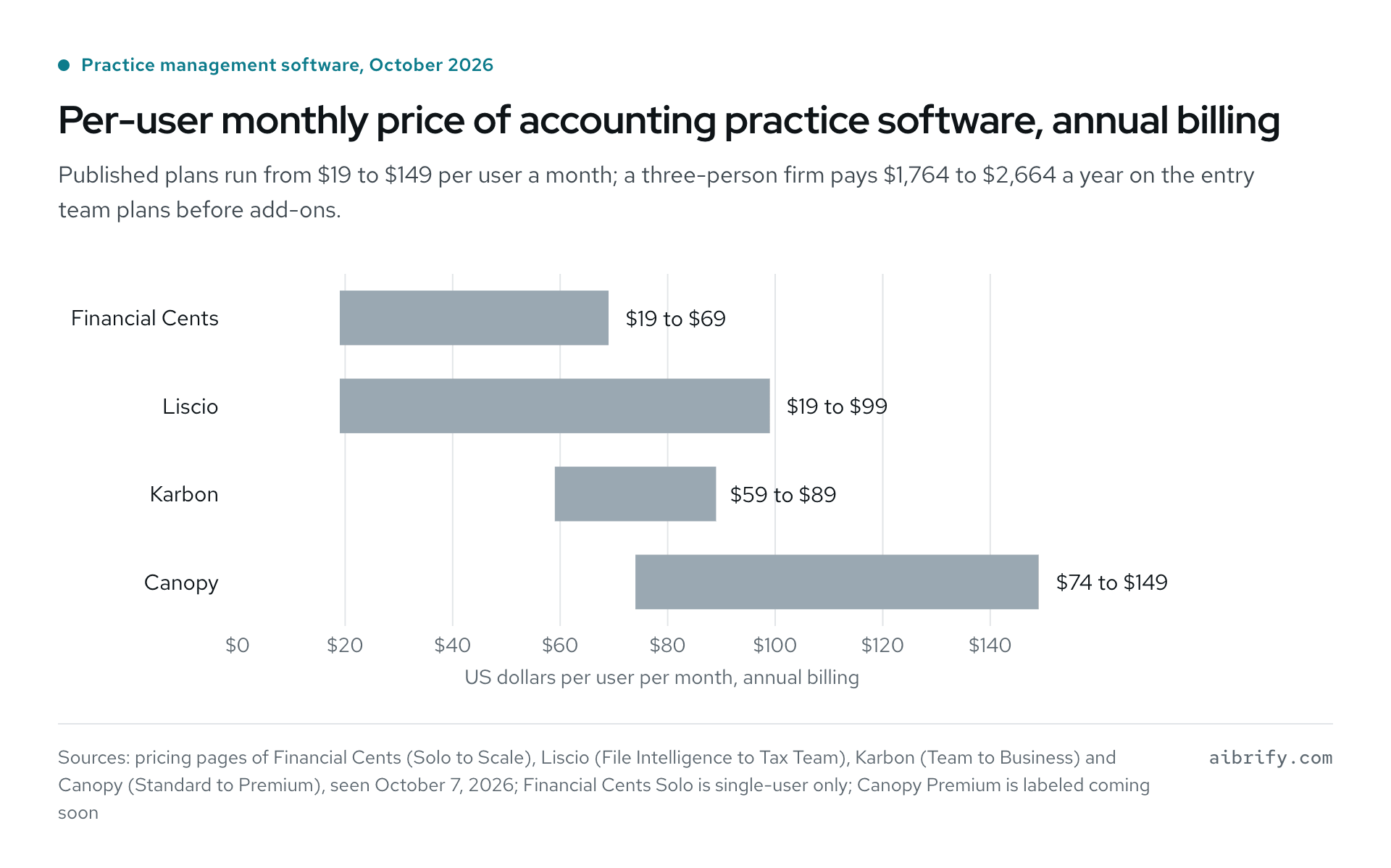
The chart shows each tool's lowest and highest published per-user monthly price on annual billing.
| Tool | Lowest published plan | Highest published plan |
|---|---|---|
| Financial Cents | $19 (single user) | $69 |
| Liscio | $19 | $99 |
| Karbon | $59 | $89 |
| Canopy | $74 | $149 |
What that means for a three-person firm
Multiply the per-user price by three people and twelve months. Financial Cents Team and Liscio Platform both come to $1,764 a year. Karbon Team is $2,124 and Canopy Standard is $2,664, due again every year.
Against that, Aibrify's deadline reminders are $100 once. The intake portal is $1,000 once, plus $120 to $360 a year only if Aibrify hosts it. Neither is a suite; each is one piece of software built to the firm's checklist, with code and accounts handed over at delivery.
A suite earns its fee when the firm uses most of it: workflow, time and billing, e-signature, the portal and the reporting. Many small firms pay for the suite and use the portal and the task list. If the portal is the part clients touch, a portal the firm owns is the cheaper route.
The logic of fixed pricing is in how custom software is priced and the business automation cost guide.
How Do Deadline Reminders Work for a Tax Practice?
A deadline reminder automation reads your client list and messages each client a set number of days before a filing or payment date. It costs $100 at Aibrify, usually ships in two or three days, and runs without anyone pressing send.
The 2026 federal calendar the automation runs on
The dates come from IRS Publication 509, Tax Calendars for 2026. Weekend shifts are already applied, so the partnership deadline reads March 16.
| 2026 date | What calendar-year clients owe, per Publication 509 |
|---|---|
| January 15 | Fourth installment of 2025 estimated tax |
| February 2 | Form W-2 copies to employees; Form 1099-NEC filed |
| March 16 | Forms 1065 and 1120-S, or Form 7004 for a six-month extension to September 15 |
| April 15 | Form 1040, or Form 4868 to extend to October 15; first 2026 estimated installment; Form 1120 |
| June 15 | Second 2026 estimated installment |
| September 15 | Third estimated installment; extended Forms 1065 and 1120-S |
| October 15 | Extended Form 1040 and extended Form 1120 |
| December 15 | Corporations' fourth estimated installment |
What the $100 version does
The automation needs one spreadsheet: client name, mobile number or email, entity type, and the dates that apply. From there it does four things.
- Sends a first reminder 30 days out, listing the documents the firm still needs from that client.
- Sends a second reminder at 14 days and a short one at 3 days, skipping clients already marked complete.
- Copies the firm on every message, so the preparer sees who was nudged and when.
- Posts a daily list of clients who have not replied, so a person calls only where needed.
A bookkeeping practice uses the same mechanism for month-end: the sheet holds each client's statement due date, and the message goes out two days before. More single automations at this price are in what $100 buys in automation.
How Does a Document Intake Portal Replace the Email Chase?
A document intake portal gives each client a login, a checklist of what the firm needs, and a place to upload from a phone camera. At Aibrify it is a $1,000 application with logins, built in two to three weeks. The firm owns the code and accounts from delivery, and the forty-message email thread becomes one page: what is in, what is missing.
What the portal does, and what the preparer still does
| The portal does this | The preparer still does this |
|---|---|
| Shows each client a checklist by return type: W-2s, 1099s, K-1s, prior-year return | Decides what belongs on the checklist for an unusual client |
| Accepts photos and PDFs from a phone, names them, files them in the firm's storage | Reads the documents and spots what is wrong or missing in substance |
| Marks items received and shows a progress bar to the client | Reviews, prepares and signs the return |
| Nudges clients about missing items and gives staff one screen sorted by completeness | Calls the client whose situation changed, and chooses which returns to extend |
The portal does not look inside your tax software and does not need to. Files land in a storage account the firm controls, and the preparer works from there as before. If the firm later wants the portal to read a spreadsheet export from its suite, that is a scoped change at the same prices.
Security is a plan, not a feature
The IRS reminds preparers that Federal Trade Commission regulations require professional tax preparers to create and enact security plans to protect client data. It points to Publication 4557 for the details. A portal is one line in that written plan: where client files live, who can log in, and how logins are protected.
Owning the portal makes that line easier to write. The firm's own accounts hold the files and the firm decides who has access; nothing moves to a vendor's shared tenant. Aibrify does not claim certifications on the firm's behalf, and the ownership terms are in who owns the code in custom software.
When Is a Client Status Portal Worth $5,000 or More?
A client status portal is worth building when several people answer "where is my return?" and hundreds of returns move through stages at once. It is Aibrify's system tier, from $5,000, scoped together before any price is fixed. A solo practitioner does not need one; the $100 reminder plus a weekly status email covers one person's clients.
The system tier adds what an intake portal lacks: several roles, integrations with the firm's other tools, and a plan for growth.
- Roles for partner, preparer, reviewer and client, each seeing only what applies to them.
- Stages such as documents in, in preparation, in review, ready to sign and filed, with a message to the client at each change.
- Integrations that read the firm's calendar, spreadsheets or email so status is never typed twice, plus a capacity view for the partner.
The aim is to stop the status call before it starts. A client who gets a text when the return moves to review has no reason to phone on Thursday. How many such Thursdays a firm has decides whether $5,000 is worth it.
What Stays With the CPA When a Firm Automates?
Everything that needs judgment or a signature stays with the CPA. The IRS rule is plain: anyone who prepares or assists in preparing federal tax returns for compensation must hold a valid PTIN. The fee is currently $18.75; software does not hold a PTIN and does not sign.
- Automate: due-date reminders, document requests, upload receipts, status messages, appointment booking, and the weekly list of who is behind.
- Keep: anything that answers "how much will I owe," "is this deductible," or "should I extend," plus every review and every signature.
- Keep: the first conversation with a new client, the hard one with an old client, and the written security plan.
Automation for accounting firms is at its best when it is boring. For a bookkeeper without a CPA license the division is the same: the software asks for the bank statements, and the bookkeeper reconciles them.
What About the Phone During Tax Season?
For calls that arrive while every desk is busy, Aibrify Desk is an AI receptionist at $179 a month with 400 minutes included. Extra minutes are $0.30, setup is included, and the plan is month to month. The firm keeps its number and forwards calls.
Every call opens by saying it is an AI assistant, and the call is transcribed with no audio kept. It speaks English, Mandarin and Spanish (Cantonese is not supported). A summary of each call arrives by email or Slack, in Chinese or English.
It answers what a front desk answers from memory: office hours, what to bring, how to upload, whether the firm takes new clients. It books a consultation into Desk's own calendar, takes a message about any specific return, and transfers to a person when unsure.
It gives no tax advice and does not look inside the firm's software. The same limits apply at law firms, and prices against answering services are in the AI receptionist cost guide.
What Does Aibrify Charge for This?
Aibrify is a software company in Los Angeles that builds custom automations and software for small businesses at fixed prices. Every price is quoted in writing before work starts. For accounting firms and bookkeepers the ladder reads as follows.
| Tier | Price | Accounting example | Time |
|---|---|---|---|
| One automation | $100 | Deadline reminders by text, email or WeChat | 2 to 3 days |
| One tool with its own page | $300 | Intake form to PDF, or a booking page for consultations | About a week |
| An application with logins | $1,000 | Document intake portal | 2 to 3 weeks |
| A system | $5,000 and up | Client status portal with roles and integrations | Scoped together first |
The client checks the work on a phone as it comes together, and owns the code, the repository and the accounts from delivery. Hosting with Aibrify is optional at $10 to $30 a month, or take it anywhere. Anything broken within the delivered scope is fixed free for 90 days.
After 90 days, changes are quoted at the same fixed prices, or a Care plan covers them. Care is $49 a month for one hour of changes with a reply in two business days. The $149 plan covers four hours a month with a reply the next business day.
To start, send a short brief at aibrify.com/start, four questions, or a text, email or WeChat message. Replies come within one business hour, with no sales calls and no meetings required. The automation page lists first projects by industry, and how to write a software brief shows what to put in the four answers.
Frequently Asked Questions
What should a small accounting firm automate first?
Deadline reminders come first, because the dates are public and the client list already exists. The automation reads a spreadsheet of clients and due dates and sends texts, emails or WeChat messages before each date. After that comes document collection through a portal with logins, then status updates for firms with many returns in flight.
How much does automation for accounting firms cost in 2026?
Subscription suites for accounting firms publish prices from $19 to $149 per user per month on annual billing, as of October 2026, before add-ons. Fixed-price builds from Aibrify are one-time: $100 for deadline reminders and $1,000 for a document intake portal with logins. A status portal for several roles and integrations starts at $5,000 and is scoped first.
How does a document intake portal replace the email chase?
A document intake portal gives every client a login, a checklist by return type, and an upload button that works from a phone camera. Items are marked received as they arrive, the client sees a progress bar, and staff see one list sorted by completeness. Automatic nudges go only to clients with missing items, so nobody writes reminder emails by hand.
Does the automation connect to my tax or bookkeeping software?
Aibrify automations read the inputs a firm already has: a spreadsheet, a form, a calendar, an email or a text message. They send texts, emails or WeChat messages and file documents in storage the firm controls; no connection to a named tax product is claimed. A change that reads an export from such a product is scoped and quoted separately at the same fixed prices.
What stays with the CPA when a firm automates?
Judgment, advice and signatures stay with the CPA. Federal rules require anyone who prepares or assists in preparing returns for compensation to hold a PTIN, and software does not hold one. Automation covers reminders, document requests, upload receipts, status messages and booking; questions about what a client owes or may deduct go to a person.
Who owns the code and the client data after delivery?
The firm owns the code, the repository and the accounts from the day of delivery. Client files sit in storage accounts the firm controls, and hosting with Aibrify is optional at $10 to $30 a month or can move anywhere. That matters for the written security plan federal regulations require of tax preparers, because the firm decides where files live and who logs in.
Can an AI receptionist answer an accounting firm's phone during tax season?
Aibrify Desk answers calls in English, Mandarin and Spanish at $179 a month with 400 minutes included and $0.30 per extra minute. It announces itself as an AI assistant on every call, answers hours and what-to-bring questions from the firm's material, and books consultations into its calendar. For questions about a specific return it takes a message, gives no tax advice, and transfers to a person when unsure.
How long does each automation take to build?
A single automation such as deadline reminders usually ships in two to three days, and a tool with its own page takes about a week. An application with logins, such as a document intake portal, takes two to three weeks. A client status portal, the system tier, is scoped together first, and its timeline is part of the written scope.