


Should You Automate the Spreadsheet or Build a Custom App?
Spreadsheet automation vs a custom app comes down to who edits the sheet. Keep the spreadsheet and add a $100 automation while one person edits it and the data fits.
Move to a $300 tool when customers have to touch it, and to a $1,000 application when several people need logins or roles. Size is rarely the trigger: Google Sheets holds up to 10 million cells, and the limit that matters first is people, not rows.
The spreadsheet is usually right. It is already there, the owner understands it, and most of what goes wrong is a hand-off between the sheet and something else. The question is what to add and when to stop adding.
Aibrify is a software studio in Los Angeles that builds all three steps at a fixed price. A $100 automation runs one task on the spreadsheet the business already has, usually in two to three days. A $300 tool gives customers a page of their own in about a week, and a $1,000 application adds logins in two to three weeks.
Every job gets a written scope and a fixed price first, and the client owns the code. This guide sets out the three rules, the published limits of Sheets and Excel, what automation platforms charge, and what research says about spreadsheet errors. It ends with the cases where an app is the wrong answer.
When Is a Spreadsheet Plus Automation Enough?
A spreadsheet plus automation is enough when one person edits the sheet, the data fits, and the pain is a hand-off someone does by hand. In that case the sheet stays the system of record and a $100 automation does the chore.
The published limits are generous. Google Sheets allows "up to 10 million cells or 18,278 columns" per spreadsheet, according to Google's help page. Microsoft's specifications give Excel 1,048,576 rows by 16,384 columns and 32,767 characters per cell.
A retail sheet with 2,000 products and 20 columns uses 40,000 cells, or 0.4 percent of the Sheets limit. The limit a small business hits first is not cells. It is the second person who needs to edit at the same time, or the customer who has to see the result.
Five things a $100 automation adds to a sheet that fits, drawn from the industry examples, are in the table below.
| Business | $100 automation on the existing spreadsheet | Delivery |
|---|---|---|
| Retail and wholesale | Low-stock alert when a quantity drops below its threshold | 2–3 days |
| Accountants and insurance | Deadline reminders sent from the client list | 2–3 days |
| Clinics and med spas | Review request sent after each visit logged in the sheet | 2–3 days |
| Salons and nails | No-show reminder the day before each row's appointment | 2–3 days |
| Any business | A report that emails itself every Monday from the sheet | 2–3 days |
All five can run from the sheet's own scripting on the owner's account, with no server of their own. That is why the three-year line below stays at $100.
An automation that has to receive data from outside the sheet, such as a form submission or a payment, usually needs a server. That is when the optional $10 to $30 a month hosting applies.
The alternative is an automation platform on a subscription: Zapier's free plan allows 100 tasks a month in two-step workflows. Professional starts at $19.99 a month on annual billing for 750 tasks, or $29.99 billed monthly. Make's free plan includes 1,000 credits a month with a 15-minute minimum interval, and Core is $12 a month for 10,000 credits.
Those plans fit an owner who wants to build and change the automation personally. They cost more than a one-time build when the automation only has to run and needs no server of its own, as the table shows.
| Option | Monthly price | What it includes | Source |
|---|---|---|---|
| Zapier Free | $0 | 100 tasks a month, two-step workflows | Zapier pricing, Sep 2026 |
| Zapier Professional | $19.99 on annual billing, $29.99 monthly | 750 tasks a month, multi-step workflows | Zapier pricing, Sep 2026 |
| Make Free | $0 | 1,000 credits a month, 2 active scenarios, 15-minute minimum interval | Make pricing, Sep 2026 |
| Make Core | $12 on monthly billing | 10,000 credits a month, unlimited active scenarios | Make pricing, Sep 2026 |
| Aibrify automation | $100 once; hosting optional at $10–$30 a month only if it needs its own server | One task built to the written scope; the client owns the code | Aibrify price list |
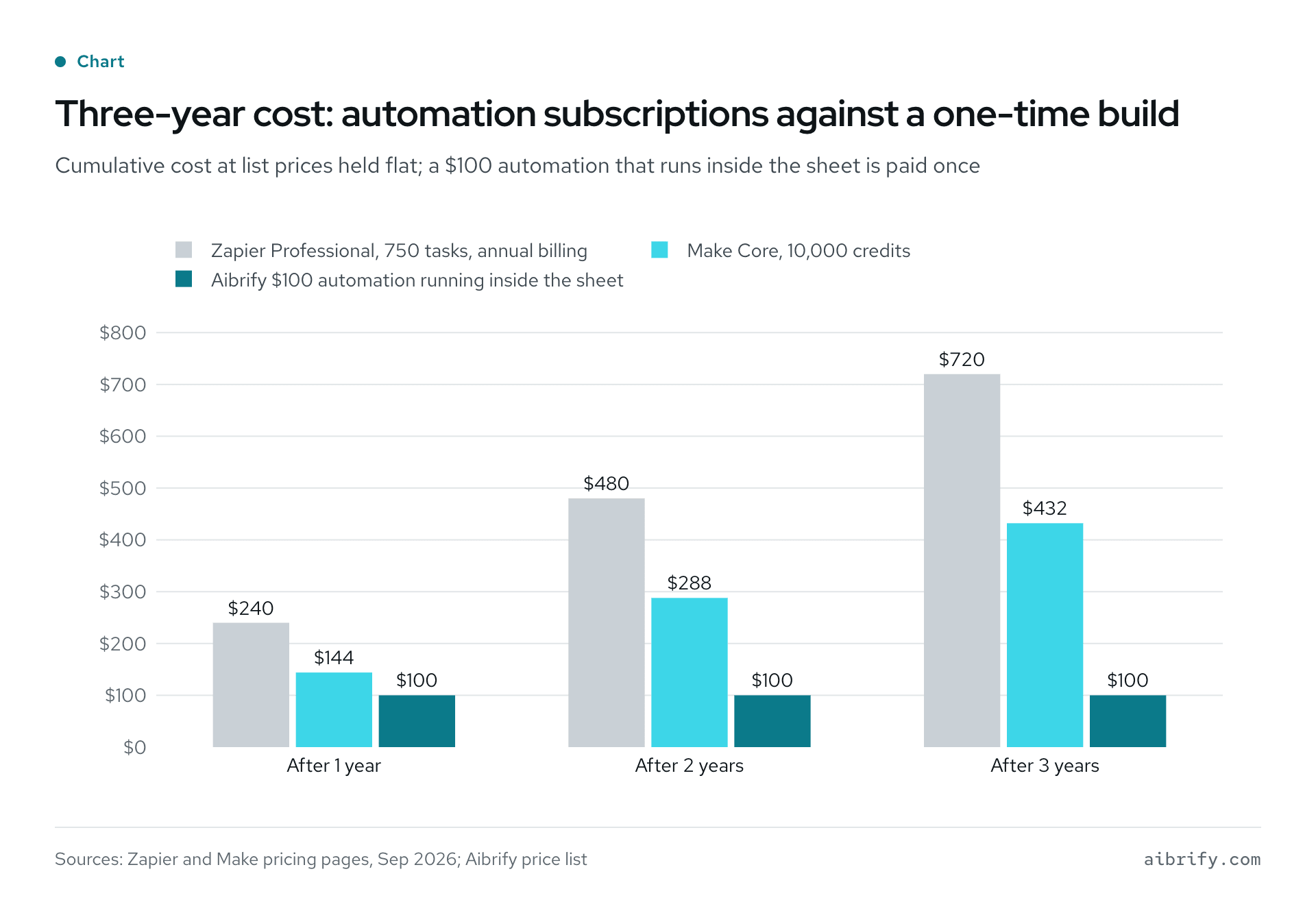
The chart shows the cumulative cost at the end of each year, with list prices held flat. Zapier is priced on annual billing and Make on monthly billing, since Make does not show an annual price. The table shows the arithmetic.
| Option | After 1 year | After 2 years | After 3 years | Basis |
|---|---|---|---|---|
| Zapier Professional, 750 tasks, annual billing | $240 | $480 | $720 | $19.99 × 12 = $239.88, rounded |
| Make Core, 10,000 credits, monthly billing (annual not shown) | $144 | $288 | $432 | $12 × 12 |
| Aibrify $100 automation running inside the sheet | $100 | $100 | $100 | One-time; hosting $10–$30 a month only if it needs its own server |
What Do Spreadsheet Errors Actually Cost?
Spreadsheet errors are common enough that a large sheet almost certainly has one. Raymond Panko's review for the European Spreadsheet Risks Interest Group found errors in 91 percent of the 54 operational spreadsheets audited from 1997 onward. Across 1,170 spreadsheets built in laboratory experiments, 51 percent had errors.
Per-cell rates are small and still add up. Three large audited spreadsheets showed cell error rates of 1.1, 2.2 and 2.5 percent, and a 2000 audit found 0.38 percent in formula cells. Panko's conclusion is that "most large spreadsheets will contain errors", and that even a few dozen cells make an error likely.
A 2016 follow-up by the same author restates three findings.
- Errors are rare per cell, but "at least one incorrect bottom-line value is very likely to be present" in a large spreadsheet.
- Errors are "extremely difficult to detect and correct" once made.
- Developers and companies are "highly overconfident" about their spreadsheets' accuracy.
The failure mode is silent. In October 2020, The Register reported that 15,841 Covid-19 cases in England went unreported because results were collected in the old XLS format.
That format is limited to 65,536 rows per sheet, and each result took several rows. Each file filled at about 1,400 cases, and the rest fell off without an error message.
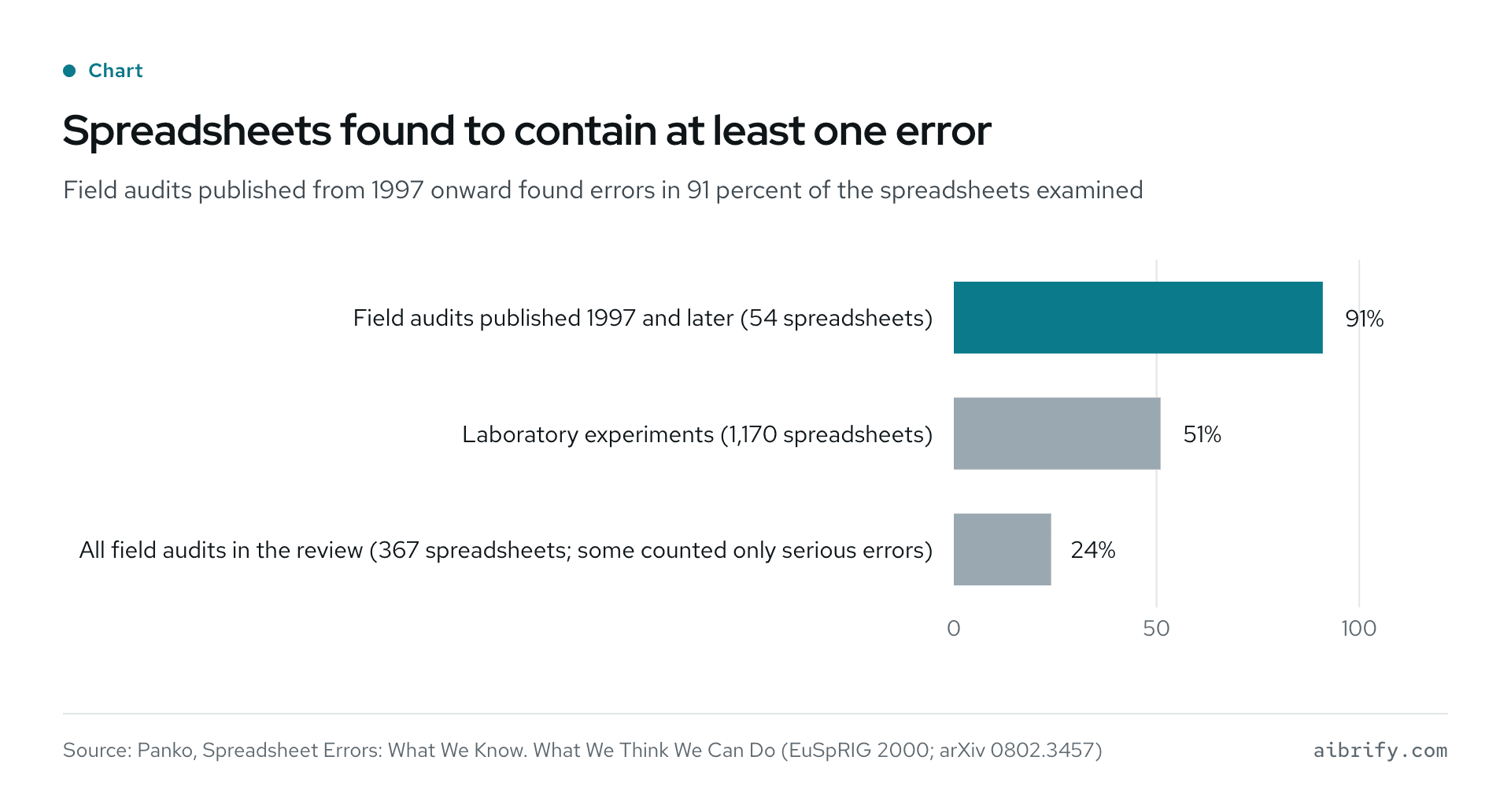
The chart shows the three summary rates from Panko's review. The table adds the basis for each.
| Sample | Spreadsheets with at least one error | Basis |
|---|---|---|
| Field audits published 1997 and later | 91% of 54 | Panko, EuSpRIG 2000 review, weighted average |
| Laboratory experiments | 51% of 1,170 | Panko, EuSpRIG 2000 review, weighted average |
| All field audits in the review | 24% of 367 | Several earlier studies counted only "serious" or "major" errors |
What this means for the decision: when a wrong cell costs money, the sheet needs validation it cannot give itself. A price, a deposit, a dose or a deadline is that kind of cell. That validation comes with a $300 tool or a $1,000 application, and it is the second reason to leave the sheet.
When Do You Need a $300 Tool?
A $300 tool is the answer when a customer has to touch the process. Nobody outside the business should see the spreadsheet, type into it, or wait for someone to copy a request out of an email into it.
The tool is one focused page with its own address, built in about a week. The spreadsheet can stay behind it as the store, or the tool can keep its own. Three examples from the price list:
- A booking page with a deposit for a salon. The customer picks a slot and pays the deposit, and the sheet or calendar gets the row. The owner never shares the sheet.
- A photo-to-quote sheet for a contractor. The contractor fills it in on site from a phone, and the pricing stays in the owner's spreadsheet.
- An open-house sign-in with follow-up for a real estate agent. Visitors sign in on a tablet, each one gets a follow-up text, and each lands in the agent's list.
What the tool adds over the sheet is validation and separation. Required fields, allowed values and a deposit taken before the slot is held are checks a shared sheet cannot enforce. The guide to $300 tools walks through each example screen by screen.
When Do You Need a $1,000 Application?
A $1,000 application is the answer when several people need logins or roles, edit at once, or have to trust the data later. Those are the three things a spreadsheet handles worst.
Logins and roles decide who sees what. A membership tracker for a salon, an intake portal for an accountant, or a wholesale order form with tiers gives each person their own view. A shared sheet cannot give each person a different view without add-ons.
Simultaneous editing is where sheets get fragile. Google Sheets and Excel co-authoring merge two people's typing, but nothing stops one person sorting a column or deleting a formula the other depends on. Version history records the damage rather than preventing it; an application validates each change, limits who makes it, and logs it by name and time.
The spreadsheet-database middle ground has a per-seat price: Airtable charges $20 a user a month on its Team plan and $45 on Business, billed annually. Five people on Team cost $1,200 a year, or $3,600 over three years. A $1,000 application costs $1,000 once, plus optional hosting at $10 to $30 a month.
| Need | Shared spreadsheet | Airtable Team, 5 users | Aibrify $1,000 application |
|---|---|---|---|
| Logins and roles | Everyone sees everything, short of add-ons | Yes, per seat | Yes, built to the scope |
| Two people editing at once | Merged, but anyone can sort, paste over or delete the other's rows | Yes, per record | Yes, validated and permissioned |
| Customers touching it | No | Through forms | Yes |
| Cost over three years | $0 plus staff time | $3,600 at $20 × 5 × 36 | $1,000 once, plus $360–$1,080 if hosted with Aibrify |
| Who owns it | The business owns the file | The vendor owns the platform | The client owns the code |
The price list has four $1,000 examples: a catering order form with a deposit, an estimate builder, a membership tracker and a document intake portal. Each is delivered in two to three weeks and talks to the tools the business already uses.
How Do You Decide in Five Minutes?
Three questions settle it: who edits, who sees, and what a wrong cell costs. The table turns them into a decision.
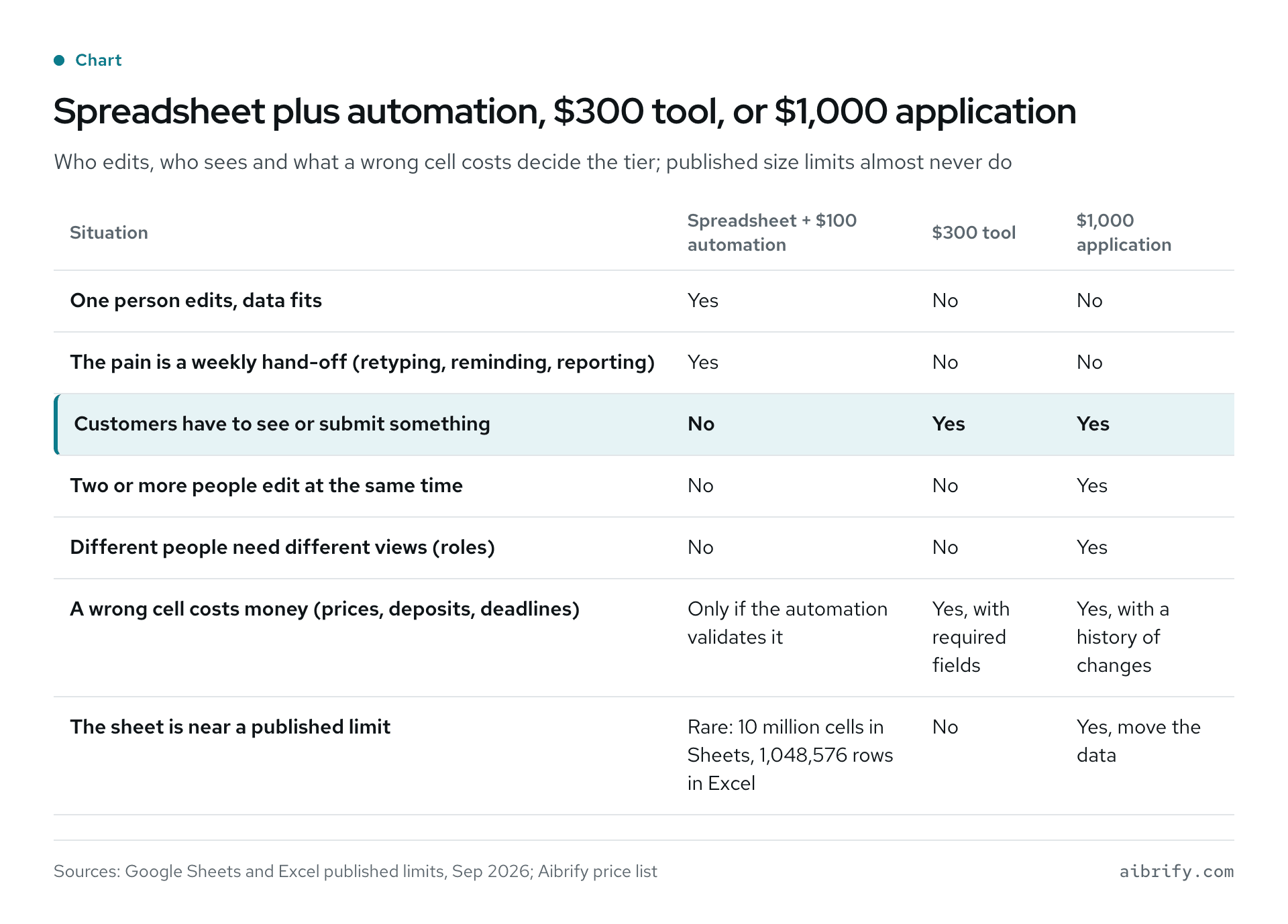
The table maps seven situations to the three tiers. The rows below repeat the same content as text.
| Situation | Spreadsheet + $100 automation | $300 tool | $1,000 application |
|---|---|---|---|
| One person edits, data fits | Yes | No | No |
| The pain is a weekly hand-off (retyping, reminding, reporting) | Yes | No | No |
| Customers have to see or submit something | No | Yes | Yes |
| Two or more people edit at the same time | No | No | Yes |
| Different people need different views (roles) | No | No | Yes |
| A wrong cell costs money (prices, deposits, deadlines) | Only if the automation validates it | Yes, with required fields | Yes, with a history of changes |
| The sheet is near a published limit | Rare: 10 million cells in Sheets, 1,048,576 rows in Excel | No | Yes, move the data |
The decision doubles as a brief. Write down who edits the sheet today, who has to see the result, and which cell would hurt if it were wrong. The brief-writing guide turns that into five questions, and the cost guide shows what each tier includes.
Aibrify quotes all three tiers from the same short text. A reply comes within one business hour, and the scope and fixed price are written before work starts. The client reviews the result on a phone and owns the code afterwards; the ownership guide explains the handover.
When Is a Custom App the Wrong Choice?
A custom app is the wrong choice in four cases, and each has a cheaper fix. The sheet works for one user, the process is still changing, the app would just be a prettier sheet, or nobody keeps the data clean.
One editor, no customers. A sheet one person maintains is already an application with a familiar interface. Adding a $100 automation for the chore is the whole answer; a $1,000 app would add logins and roles one person does not need.
The process is still changing. A sheet can be reshaped in an afternoon; an application freezes the shape into fields and roles. Wait until the columns have stopped moving.
A prettier spreadsheet. If the request is "the same table, nicer", the fix is a template, a filter or an off-the-shelf tool. The build-or-buy guide shows when a packaged product covers the job.
Nobody will keep the data clean. An app validates what goes in, but it cannot fix what was already wrong. Panko's review found only one technique, "cell-by-cell code inspection", proven to reduce spreadsheet errors, and that inspection happens before a migration, not after.
When a sheet is retired, the step is to export it, inspect the cells that feed prices, deposits or deadlines, and only then import them. The written scope can name which columns get that inspection.
Frequently Asked Questions (FAQ)
When should a business replace a spreadsheet with a custom app?
Replace a spreadsheet with a custom app when several people need logins or roles, edit at once, or when customers must see or submit something. Until then, a spreadsheet plus a $100 automation is usually enough. Aibrify's ladder runs from a $100 automation to a $300 tool to a $1,000 application, each at a fixed price.
What can a $100 spreadsheet automation do?
A $100 spreadsheet automation runs one task on the existing sheet: low-stock alerts, deadline reminders, no-show texts, review requests or a Monday report. Aibrify delivers it in two to three days, and the client owns the code. Hosting applies only if the automation needs its own server, at $10 to $30 a month.
How many rows can Google Sheets and Excel handle?
Google Sheets allows up to 10 million cells or 18,278 columns per spreadsheet, per Google's help page. Excel allows 1,048,576 rows by 16,384 columns and 32,767 characters per cell, per Microsoft's specifications. A small business rarely reaches either; the practical limits are shared editing and customer access.
How common are spreadsheet errors?
Spreadsheet errors are very common. In Raymond Panko's review, 91 percent of 54 operational spreadsheets audited from 1997 onward contained errors, and 51 percent of 1,170 laboratory spreadsheets did. Cell error rates in large audited spreadsheets ran from 1.1 to 2.5 percent, enough for most large spreadsheets to contain at least one error.
Is Zapier or Make cheaper than a custom automation?
Zapier and Make are cheaper than a custom automation only in the first few months. Zapier Professional costs $19.99 a month on annual billing, about $720 over three years, and Make Core costs $12 a month, or $432. A $100 Aibrify automation is paid once, with hosting only if it needs its own server, while free plans cap tasks and steps.
What is the difference between a $300 tool and a $1,000 app?
A $300 tool is one focused page with its own address, such as a booking page with a deposit, built in about a week. A $1,000 application adds logins, roles and data that several people work on at once, built in two to three weeks. Both prices are fixed in writing before work starts.
Can a custom app keep using my spreadsheet?
Yes. A $300 tool can write into the existing sheet, so the owner keeps a familiar view, and a $100 automation runs on the sheet itself. A $1,000 application usually keeps its own data for logins and history, and can export to a sheet on schedule; the written scope states which.
Who owns the automation or app after it is built?
The client owns the automation or app: Aibrify's written scope, the same document that fixes the price, states that the client owns the code. Handover includes the repository and credentials, and hosting is optional at $10 to $30 a month. Any developer can maintain owned code, and the data leaves with the business.
What Should You Do Next?
Open the spreadsheet that runs the business and answer three questions. Who edits it, who has to see it, and which cell would hurt if it were wrong? One editor and no customers means a $100 automation; customers mean a $300 tool, and logins mean a $1,000 application.
Text or email Aibrify those three answers and the sheet's column headings. Aibrify replies within one business hour, and a written scope with a fixed price follows before any work starts.
A first project can be as small as a $100 automation, which the price list puts at two to three days. The client owns the code either way. See the current prices or start a project.


