


What Business Automations Can a Small Business Buy for $100?
These 12 business automation examples cost $100 each. Every one is a single task that runs itself, such as a reminder that sends on schedule or a report that emails itself every Monday. Aibrify builds one in two to three days at a fixed price agreed in writing.
Entrepreneurs spend 36 percent of a 45.5-hour week on administrative tasks, according to an undated Time etc survey of 251 US entrepreneurs. That share works out to about 16 hours a week of logging expenses, creating invoices, entering data and ordering supplies. Each task can go to one small piece of software that watches a spreadsheet, a calendar or an inbox and acts when something changes.
Aibrify is a software studio in Los Angeles that prices work by outcome. An automation is $100, a tool with its own page is $300, an application with logins is $1,000, and a custom system starts at $5,000.
The 12 automations below are the kind of first project the $100 tier is built for, grouped by industry. Each entry says what it replaces and what the published evidence shows.
How Much Time Does Admin Work Take From a Business Owner?
Administrative work takes about 16 hours of a 45.5-hour week, if the 36 percent share in the Time etc survey holds for your business. Nearly a third of the entrepreneurs surveyed (31 percent) spend between 26 and 50 percent of their week on small admin tasks.
In the same survey, 59 percent of entrepreneurs log expenses themselves and 44 percent create invoices. Another 43 percent do data entry, and 40 percent place orders for supplies and equipment. Each of those is a candidate for a $100 automation, because each one is the same task repeated on a schedule.
The arithmetic matters when the owner is the most expensive person in the building. A receptionist earns a median $18.27 an hour, per the Bureau of Labor Statistics in May 2025. Priced at only that rate, 16 hours of admin a week is $292, or about $15,200 a year.
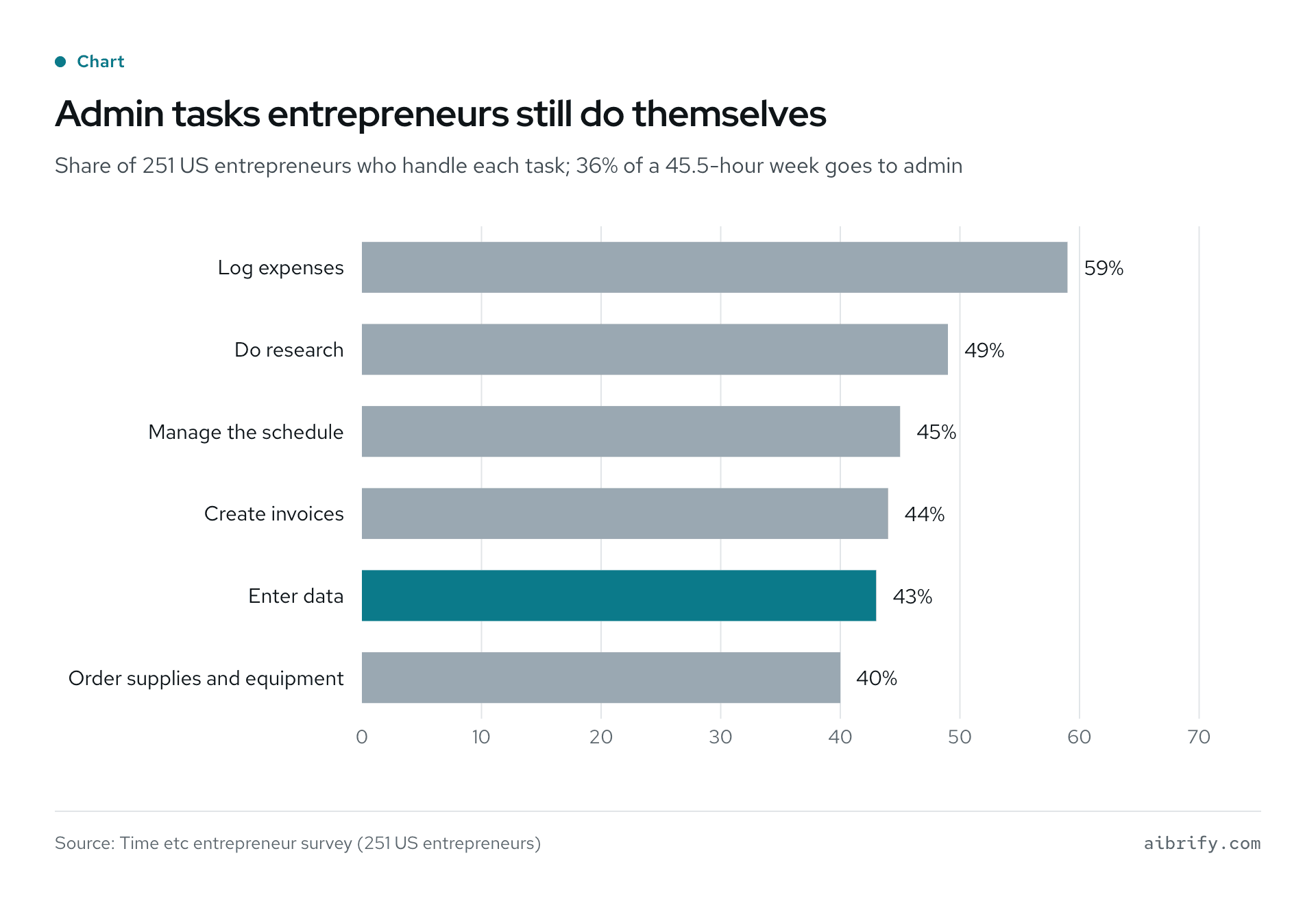
The chart shows the share of surveyed entrepreneurs who do each task themselves. The table lists the same figures with the automation that removes each task.
| Admin task done by the owner | Share of entrepreneurs | A $100 automation that removes it |
|---|---|---|
| Log expenses | 59% | A form that files itself |
| Do research | 49% | Not an automation; keep doing it |
| Manage the schedule | 45% | No-show reminder by text |
| Create invoices | 44% | Unpaid-invoice reminder |
| Enter data | 43% | A form that files itself |
| Order supplies and equipment | 40% | Low-stock alert from the inventory sheet |
What Are the 12 Business Automation Examples?
The 12 automations below each do one job, touch one or two tools the business already uses, and usually ship in two to three days. Prices are fixed in writing before work starts, and the client owns the code.
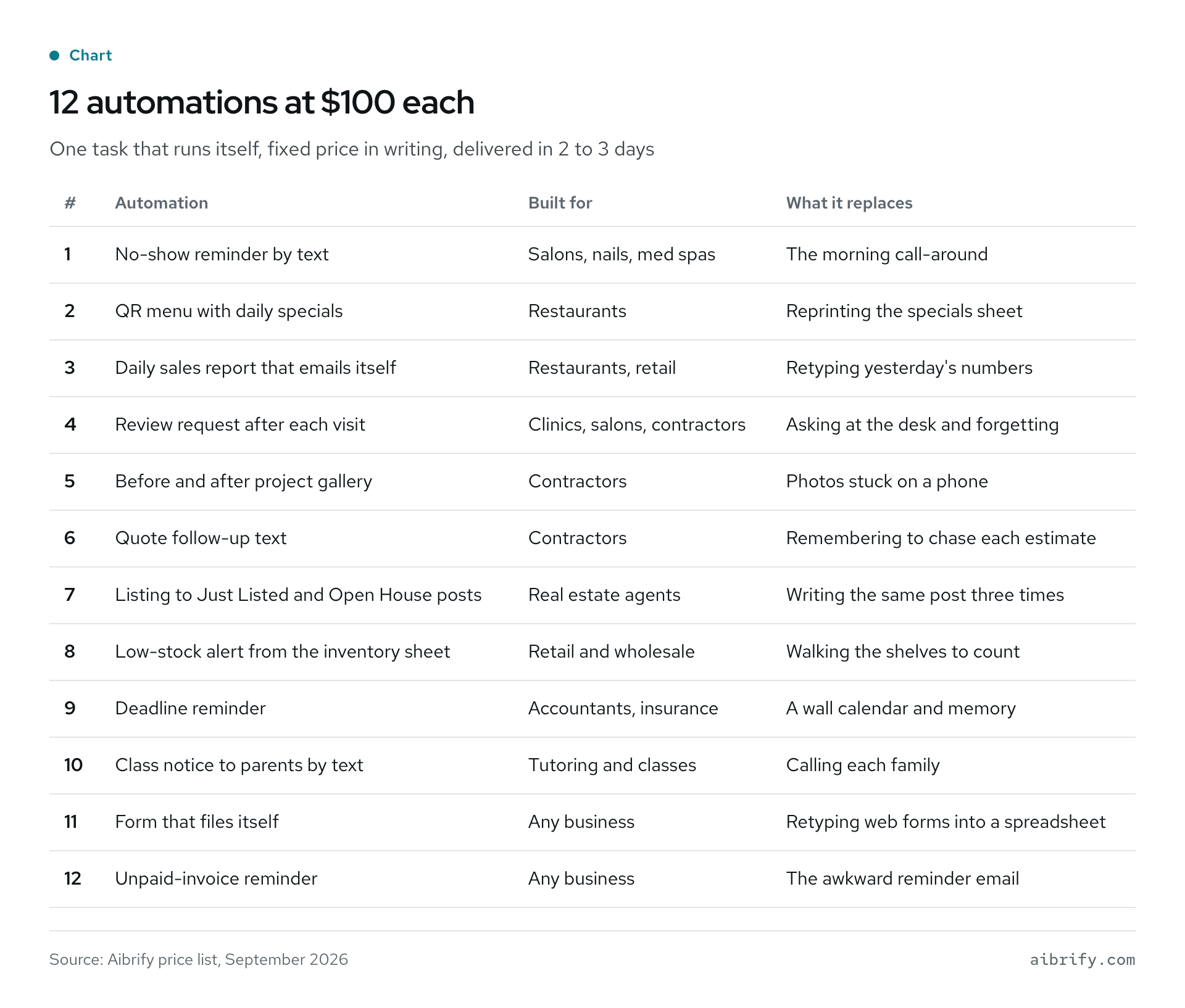
The image lists all 12 with the industry and what each one replaces. The same list follows in text.
| # | Automation | Built for | What it replaces |
|---|---|---|---|
| 1 | No-show reminder by text | Salons, nails, med spas | The morning call-around |
| 2 | QR menu with daily specials | Restaurants | Reprinting the specials sheet |
| 3 | Daily sales report that emails itself | Restaurants, retail | Retyping yesterday's numbers |
| 4 | Review request after each visit | Clinics, salons, contractors | Asking at the desk and forgetting |
| 5 | Before and after project gallery | Contractors | Photos stuck on a phone |
| 6 | Quote follow-up text | Contractors | Remembering to chase each estimate |
| 7 | Listing to Just Listed and Open House posts | Real estate agents | Writing the same post three times |
| 8 | Low-stock alert from the inventory sheet | Retail and wholesale | Walking the shelves to count |
| 9 | Deadline reminder | Accountants, insurance | A wall calendar and memory |
| 10 | Class notice to parents by text | Tutoring and classes | Calling each family |
| 11 | Form that files itself | Any business | Retyping web forms into a spreadsheet |
| 12 | Unpaid-invoice reminder | Any business | The awkward reminder email |
Every item on the list costs $100 and usually takes two to three days. The examples by industry on the homepage show how each one sits next to the $300 and $1,000 projects for the same business.
Which $100 Automations Fit Restaurants and Salons?
Restaurants and salons run on chairs and paper, so the three automations below are a reminder, a menu and a report.
1. No-show reminder by text, $100. The day before each appointment, a text goes to the client with the time and the address. In a randomized pediatric clinic trial, the no-show rate was 23.5 percent with text reminders and 38.1 percent without, per Lin and colleagues. A one-way reminder is the $100 version; the version that takes a reply to confirm or reschedule is a $300 tool.
2. QR menu with daily specials, $100. The owner edits one line in a spreadsheet, and the menu behind the QR code updates. It replaces the reprinted specials sheet and the taped-over price. Time saved is an assumption, not a measured figure: about ten minutes a day of printing and taping.
3. Daily sales report that emails itself, $100. Yesterday's sales, covers or tickets arrive by email each morning, pulled from the POS export. It replaces retyping numbers into a message for a partner or an accountant. In the Time etc survey, 43 percent of entrepreneurs still do data entry themselves.
Restaurants that also lose orders on the phone are covered in the virtual receptionist for restaurants guide. That is a monthly service, not a $100 build.
Which Fit Clinics, Contractors and Real Estate Agents?
Clinics, contractors and agents each have a follow-up that belongs after every visit, quote or listing. These four automations send it on schedule instead of leaving it to memory.
4. Review request after each visit, $100. When a visit is marked complete, a text or email asks for a review with a direct link. Asking works: 83 percent of people asked to leave a review went on to leave one, according to BrightLocal's 2026 survey of 1,002 US consumers. Freshness matters too, because 74 percent of consumers seek reviews written in the last three months.
5. Before and after project gallery, $100. The contractor texts two photos and a caption from the site, and the gallery page adds them. Each photo is uploaded once, and the gallery updates the day the job is done. Time saved is an assumption: a few minutes per project, but the gallery finally exists.
6. Quote follow-up text, $100. Three days after an estimate goes out, a text asks whether the customer has questions and offers a start date. It replaces the follow-up the contractor meant to make from the truck. Harvard Business Review found firms that tried a customer within an hour nearly seven times likelier to qualify the lead than firms an hour slower.
7. Listing to Just Listed and Open House posts, $100. A new row in the listing sheet becomes a Just Listed and an Open House post. The agent approves them and posts. The lead follow-up guide shows where the post sits in the rest of the agent's follow-up.
For clinics, two related projects sit one tier up: appointment reminders that take replies, and an intake form that becomes a PDF, both $300. The $300 tool guide shows what that price buys.
Which Fit Retail, Accountants and Tutoring?
Retail, accounting and tutoring run on lists: stock levels, filing dates, class schedules. When the list lives in a spreadsheet, a $100 automation can watch it.
8. Low-stock alert from the inventory sheet, $100. When any item drops below its minimum, the owner gets a text with the item and the supplier. It replaces the walk-through count and the emergency order. Time saved is an assumption: one count a week, plus the sale that would have been missed.
9. Deadline reminder, $100. A sheet of client deadlines becomes a text to each client 30, 14 and 3 days before the date. The stakes are published: the IRS charges 5 percent of the unpaid tax for each month a return is late, up to 25 percent. For returns due after December 31, 2025, filing more than 60 days late costs at least $525 or the full underpayment, whichever is less.
10. Class notice to parents by text, $100. A tutor types one line in the schedule sheet, and every parent in that class gets a text. It replaces calling each family about a change or a make-up date. Adding WeChat delivery moves it into the $300 tier, which is how the tutoring examples list it on the homepage.
11. Form that files itself, $100. A website form writes each entry to a spreadsheet, confirms to the customer and texts the owner. It replaces copying entries from email into a sheet by hand. Expense logging, done by 59 percent of surveyed entrepreneurs, is the same automation pointed at receipts.
12. Unpaid-invoice reminder, $100. Seven and fourteen days after an invoice is due, a polite reminder goes out with the amount and the payment link. In the Time etc survey, 44 percent of entrepreneurs create their own invoices, and the chasing is the part nobody schedules.
Do Text Reminders Really Cut No-Shows?
Yes. Across 29 studies, reminders cut non-attendance by a weighted mean of 34 percent of the baseline rate, per Hasvold and Wootton. Automated reminders cut it by 29 percent and manual phone calls by 39 percent.
The baseline is large: the median no-show rate before reminders was 23 percent in that review, and 13 percent after. A 2018 review of 105 studies in Health Policy put the average no-show rate at about 23 percent. The range ran from 13.2 percent in Oceania to 43.0 percent in Africa.
Cost is the other half. The same review put the cost of a text or automated call at €0.14 per reminder, against €0.90 for a call made by staff. The $100 automation is the €0.14 kind, sent on a schedule with nobody dialing.
Wording matters as well. In a London hospital trial of 10,111 patients, the standard reminder text produced an 11.1 percent no-show rate. A text that stated the £161 cost of a missed appointment cut it to 8.4 percent, per Hallsworth and colleagues in PLOS One.
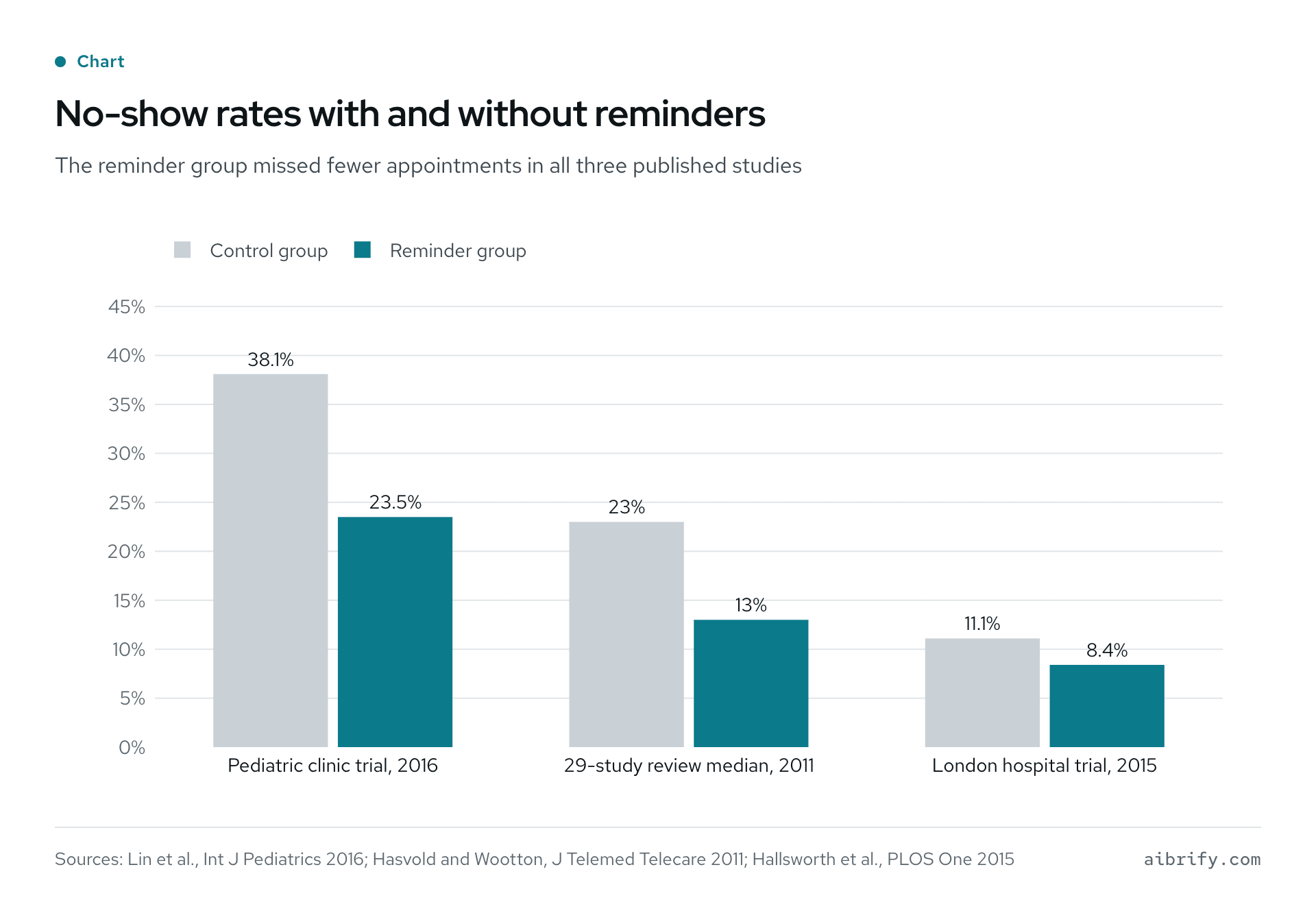
The chart compares the control and reminder groups in the three studies. The table gives the figures and what each control group received.
| Study | Control group | Reminder group | Basis |
|---|---|---|---|
| Pediatric clinic trial, Lin and colleagues, 2016 | 38.1% | 23.5% | 170 patients, randomized; control had no text reminder |
| 29-study review, Hasvold and Wootton 2011 | 23% | 13% | Median baseline and post-intervention rates across 33 estimates |
| London hospital trial, Hallsworth and colleagues, 2015 | 11.1% | 8.4% | 10,111 patients, randomized; control got the standard text, reminder group a text stating the £161 cost |
How Does a $100 Automation Get Built in Two to Three Days?
The build is fast because the scope is one task and the tools already exist. Aibrify follows the same four steps for every project.
- Brief. Text, email or WeChat one paragraph: the task, who does it now, and which tools it touches. A five-minute brief is enough, and Aibrify replies within one business hour.
- Scope and fixed quote. The reply is a written scope: the trigger, the action, the tools involved, and what is out of scope. The $100 price attaches to that document before any work starts.
- Build and review. The automation is built and run against real data. The owner checks it on a phone, because that is where the text or email lands.
- Ship and hand over. The client owns the code and can take it anywhere. Hosting with Aibrify is optional at $10 to $30 a month, and many $100 automations run inside tools the business already pays for.
Fixes for anything broken in the delivered scope are included. Changes after delivery, such as a new trigger or a second channel, are quoted separately in writing.
If the automation would help more than one business, post it on the wish wall. Every month Aibrify builds one requested tool for free, and everyone can use it. The cost guide explains how the four tiers relate, and who owns the code covers ownership and handover.
When Is a $100 Automation the Wrong Choice?
Four signs say the task is not a $100 automation. The task changes every week, customers need to interact with it, several people need logins, or the data lives nowhere.
The task changes every week. An automation follows a rule. If the rule is different each time, a person is still cheaper than a rewrite.
Customers need to interact with it. A reminder is one-way. Once customers pick a time, pay a deposit or answer branching questions, the job is a $300 tool with its own page.
Several people need logins. Roles, permissions and records that persist belong to the $1,000 application tier. A membership tracker for a salon or a document intake portal for an accountant lives there.
The data lives nowhere. An automation needs an input it can read: a spreadsheet, a calendar, a form or a POS export. If bookings live in a paper diary, the first step is a sheet, not software.
There is a fifth case: the packaged tool already does it. If the business already pays for a scheduling app, check whether its subscription includes reminders; turning that on costs nothing. The build-or-buy guide covers that decision, and spreadsheet plus automation or a custom app covers when to leave the sheet behind.
Frequently Asked Questions (FAQ)
What can a $100 automation actually do?
One task that runs itself: a text reminder before appointments, a review request after each visit, or a low-stock alert from a spreadsheet. Aibrify builds it in two to three days for a fixed $100. The task has to live in one workflow and use tools the business already has.
How long does a $100 automation take to build?
Two to three working days once the written scope is approved. The brief takes five minutes by text or email, and Aibrify replies with a written scope and a fixed price. Once the owner approves, the build runs on real data and the owner checks the result on a phone before it goes live.
Do text reminders really reduce no-shows?
Yes, and by a wide margin: a randomized pediatric clinic trial found a 23.5 percent no-show rate with text reminders and 38.1 percent without. A review of 29 studies found reminders cut non-attendance by a weighted mean of 34 percent of the baseline rate. Automated reminders cut 29 percent and phone calls 39 percent.
How many customers leave a review when asked?
Most of them: in BrightLocal's 2026 survey of 1,002 US consumers, 83 percent of people asked to leave a review went on to leave one. Some 28 percent say they will always write one if asked. A review request that sends itself after each visit is the automated way to ask every time.
Do I need a new subscription to run a $100 automation?
Usually no, because a $100 automation reads from tools the business already uses, such as a spreadsheet, a calendar or a POS export. It sends by text or email. Hosting with Aibrify is optional at $10 to $30 a month for automations that need a server of their own.
What happens if the automation breaks?
Fixes for anything broken within the delivered scope are included in the $100 price. Changes that go beyond the written scope, such as a new trigger or a second channel, are quoted separately in writing before any work starts. The client owns the code, so another developer can maintain it as well.
What is the difference between a $100 automation and a $300 tool?
A $100 automation runs one task with no page of its own, such as a reminder or an alert. A $300 tool has its own page that customers or staff use, such as a booking page with a deposit, and takes about a week. Customer interaction is the dividing line.
Can a $100 automation send messages in Chinese?
Yes, in either language or both. Aibrify works in English and Chinese, so a reminder, a parent notice or a review request goes out in whichever language the customer uses. The language is set in the written scope and costs nothing extra at the $100 price.
What Should You Do Next?
Choose the item on this list that repeats every week, and write down where its data lives today: a sheet, a calendar, a POS export. Those two facts are the whole brief.
Send them to Aibrify by text or email; the reply arrives within one business hour. The written scope and fixed $100 price come before any work starts, delivery usually takes two to three days, and the client owns the code. Start a project with the brief, or check the current prices first.


