What Is Workflow Automation for a Small Business, and Which Workflow Comes First?
Workflow automation for a small business is a rule that runs without a person: when one thing happens, a second thing follows. A form arrives and a text goes out; a due date nears and a reminder is sent; a cell changes and a page updates. The first workflow to automate is the one you repeat most and forget at the highest cost.
This guide lists 20 such workflows across nine industries. Each comes with its trigger, its action, what it replaces, and the fixed price it maps to at Aibrify, a software company in Los Angeles. One automation is $100, a tool with its own page is $300, and an application with logins is $1,000.
None of the 20 asks you to change systems. They integrate with the tools you already use: a spreadsheet, a form, a calendar, a text thread or an inbox. What comes out is a text, an email, a WeChat message, a PDF or a page that updates itself.
How Many Small Businesses Automate Today?
Between one in five and two in three, depending on who asks and how. The Census Bureau's Business Trends and Outlook Survey ran from December 14, 2025 to May 3, 2026. It found 17% to 20% of US businesses using AI in any business function.
The US Chamber of Commerce reports a different level. Its October 2026 report says AI adoption among small businesses rose from 23% in 2023 to 66%. Owners use it for marketing, customer service and daily workflow management.
The two surveys ask different questions of different samples, so the levels do not compare; the direction does. In the Census data, 37% of firms with 250 or more employees used AI, against under 20% of firms with four or fewer. Size matters more than the year: the smallest businesses, the ones this guide is for, are the least automated.
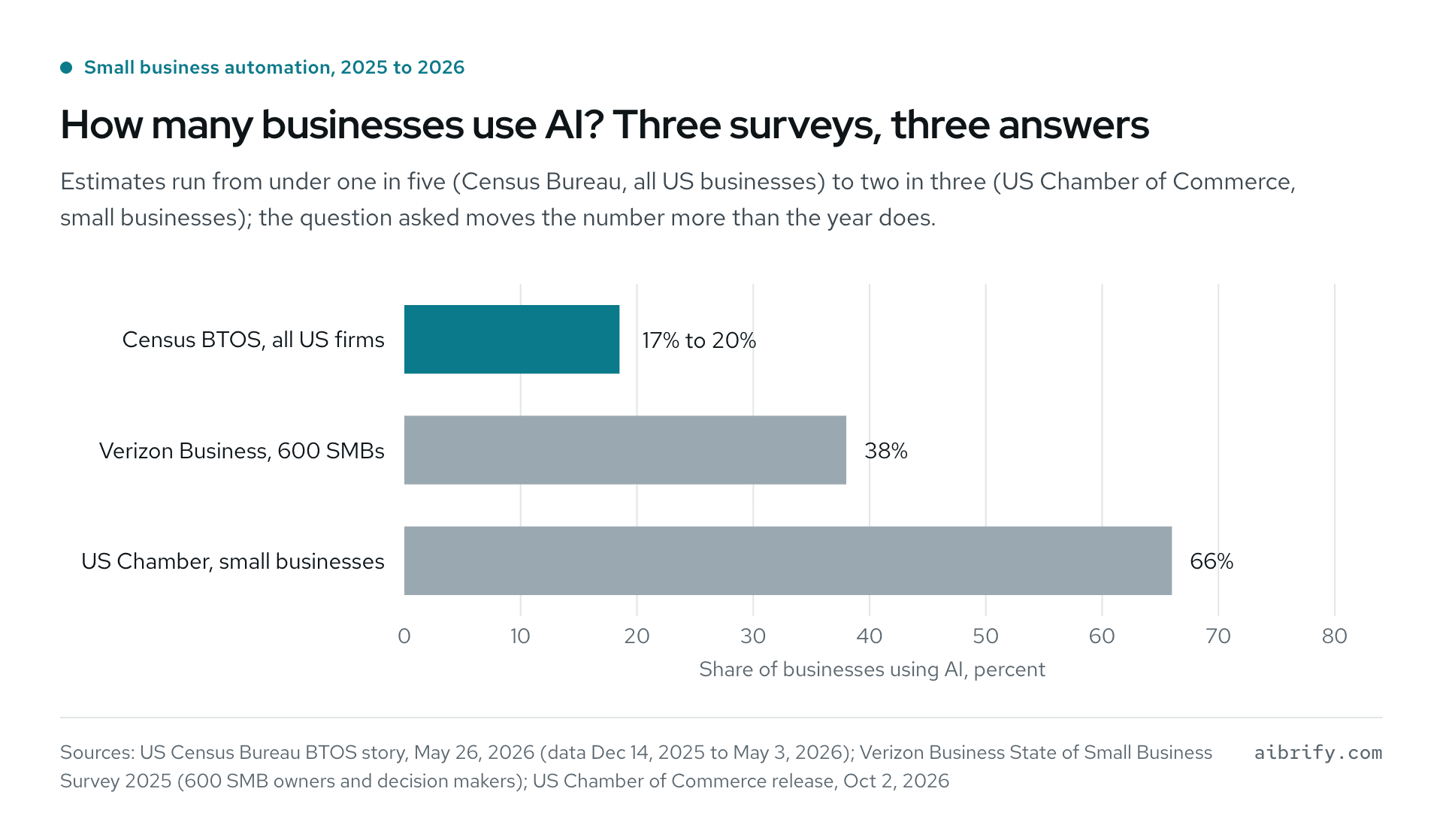
The chart compares the three surveys. The table carries the same figures with their samples.
| Survey | Who was asked | When | Share using AI |
|---|---|---|---|
| Census Bureau BTOS | All US businesses, by employment size | Dec 14, 2025 to May 3, 2026 | 17% to 20% overall; under 20% at four or fewer employees; 37% at 250 or more |
| Verizon Business, sixth annual survey | 600 small and midsize business owners and decision makers | 2025 | 38%; 28% for marketing and social media, 24% for written communications, 24% for customer-service assistants |
| US Chamber of Commerce, October 2026 report | US small businesses | Released Oct 2, 2026 | 66%, up from 23% in 2023 |
Most of the 20 workflows below are not AI at all. A reminder that sends itself is a rule, and rules are cheaper and more predictable than models. Where a model helps, such as drafting a social post from a listing, it sits inside the rule and a person approves the result.
How Do You Pick the First Workflow to Automate?
Pick a task that is repeated, rule-based, and already recorded in a tool you use, then confirm that forgetting it costs money. A confirmation, a reminder, a report, a hand-off between two tools: each passes the test. Anything that needs judgment on every run stays with a person.
Four questions sort the candidates quickly.
- Repeated: the same steps at least once a week, often daily.
- Rule-based: the steps fit on an index card and a new hire could follow them.
- Recorded: the data already sits somewhere: a calendar, a sheet, a form or an inbox.
- Costly when missed: a no-show, a cold lead, a late fee, a reprint, a refund.
To put a dollar figure on the time, use a wage you know. The Bureau of Labor Statistics lists the 2025 median pay of general office clerks at $21.64 an hour, or $45,010 a year. At that rate a $100 automation that saves one hour a week pays for itself in under five weeks.
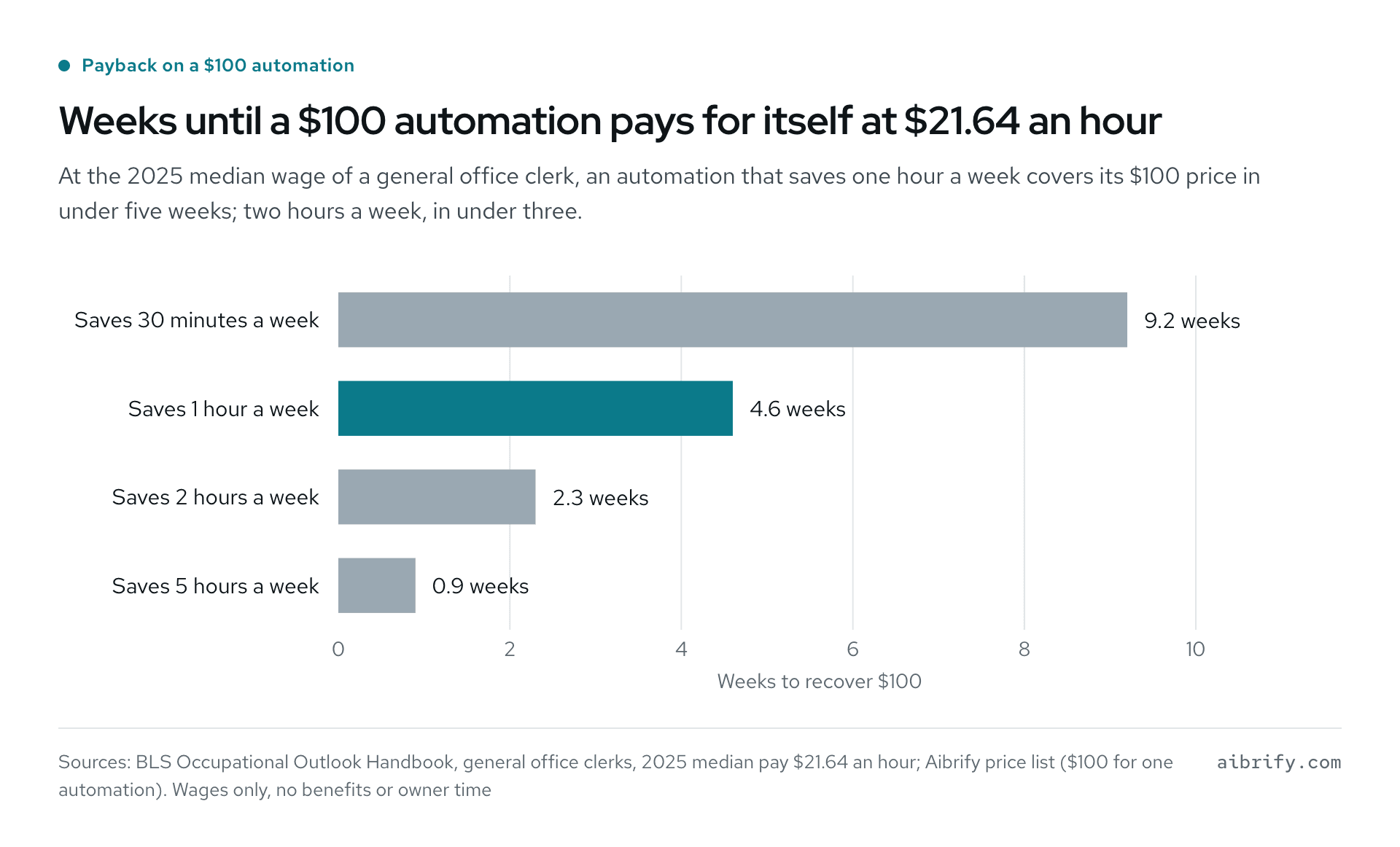
The chart shows the payback period for a $100 automation at the median clerk wage; the table repeats the arithmetic.
| Time saved each week | Wage value saved each week | Weeks to recover $100 |
|---|---|---|
| 30 minutes | $10.82 | 9.2 |
| 1 hour | $21.64 | 4.6 |
| 2 hours | $43.28 | 2.3 |
| 5 hours | $108.20 | 0.9 |
Wages only; benefits, overtime and the owner's own evenings are not in the figure. Swap in your own hourly cost and the table still works.
20 Workflows to Automate First, by Industry
Every workflow below follows the same pattern: a trigger, an action, and the manual step it replaces. Prices follow the Aibrify tiers: $100 for one automation, $300 for a page tool, $1,000 for an app with user logins. Where a trade has a longer guide in this series, the section links to it.
Restaurants
Restaurants gain most from workflows that take the phone and the printer out of the daily routine. Three fit the first month.
| # | Workflow | Trigger | Action | Replaces | Price |
|---|---|---|---|---|---|
| 1 | QR menu with daily specials | You type today's specials into a sheet or a short form | The menu page updates; the QR code on the table never changes | Reprinted inserts and a chalkboard photo on social | $100 |
| 2 | Reservation and waitlist texts | A guest books or joins the waitlist | Confirmation text, a "table is ready" text, and a reminder before the booking | Shouted names, callbacks, a paper list | $300 |
| 3 | Catering order form with deposit | A customer submits the catering form | Deposit collected, order emailed to the kitchen, confirmation sent to the customer | Phone tag and a handwritten order sheet | $1,000 |
If the phone itself is the bottleneck, Aibrify Desk answers it in English, Mandarin and Spanish at $179 a month, 400 minutes included. It takes reservation calls, answers hours and parking questions, and transfers to a person when unsure; phone ordering is coming soon. The full restaurant list is in Restaurant automation for independent restaurants.
Contractors, HVAC and Plumbing
Field trades lose their evenings to paperwork that could be finished on site. The three workflows below move the typing to the job.
| # | Workflow | Trigger | Action | Replaces | Price |
|---|---|---|---|---|---|
| 4 | Before-and-after project gallery | A tech uploads two photos from the phone | The gallery page adds the job, with the city and the service | A folder of photos nobody posts | $100 |
| 5 | Photo-to-quote sheet filled in on site | A tech fills a short form with photos while at the house | A quote PDF goes to the customer, a copy to the office | Typing quotes at the kitchen table at 9 pm | $300 |
| 6 | Estimate builder with materials | Line items are chosen from your own price list | Estimate with materials and labor, sent for approval, status tracked | A spreadsheet template that breaks when copied | $1,000 |
Missed calls while a tech is under a house are a separate problem. Missed call text back covers the $100 text-back automation, and Aibrify Desk for HVAC covers the case where the call needs answering. The longer trade guide is Automation for HVAC companies and contractors.
Clinics, Dental Offices and Med Spas
For clinics, reminders and reviews pay back fastest, and intake forms stop the clipboard. Patient data is sensitive, so each workflow is scoped to the minimum it needs.
| # | Workflow | Trigger | Action | Replaces | Price |
|---|---|---|---|---|---|
| 7 | Appointment reminders that cut no-shows | An appointment is 24 hours away | A text reminder with a reply to confirm or ask to move | Reminder calls from the front desk | $100 for text reminders; $300 with its own booking page |
| 8 | Review request after each visit | A visit is marked complete | A text with your review link, sent once | Asking at checkout and forgetting | $100 |
| 9 | Intake form to PDF | A patient submits the form on a phone | A filled PDF lands in the chart folder; staff are notified | A clipboard and a scanner | $300 |
The reminder evidence is older than the tools but still holds: a 2012 meta-analysis in Health Services Research pooled eight randomized trials. Text reminders raised the odds of attending, with a pooled odds ratio of 1.48 (95% CI 1.23 to 1.72). Channel and timing are covered in Automated appointment reminders.
Review requests work because people answer them: BrightLocal's 2026 survey asked 1,002 US consumers about reviews. 78% had been asked to leave feedback in the past year, and 83% of those asked wrote one. Privacy limits for medical offices are in Automation for dental and medical offices.
Salons and Nail Studios
Salons need the booking to stick and the package to be counted. Two workflows handle both, and the clinic reminders apply here as well.
| # | Workflow | Trigger | Action | Replaces | Price |
|---|---|---|---|---|---|
| 10 | Booking page with deposit | A client picks a time on your page | Deposit taken, calendar updated, confirmation and reminder texts sent | DM bookings and no-shows on long appointments | $300 |
| 11 | Membership and package tracker | A visit is logged | Remaining sessions update; the client gets a text at one left | A paper punch card and a memory | $1,000 |
A $100 no-show reminder is the usual first step; the booking page adds the deposit. For the phone, see AI receptionist for salons.
Real Estate Agents and Property Managers
Agents win on speed of follow-up, and managers win on requests that arrive in order. The two workflows below are for listings and open houses; the property guide covers maintenance, rent and showings.
| # | Workflow | Trigger | Action | Replaces | Price |
|---|---|---|---|---|---|
| 12 | Listing turned into Just Listed and Open House posts | A new listing is added to your sheet | Post text and image drafts for each platform, ready to approve | An hour in a design tool per listing | $100 |
| 13 | Open-house sign-in with follow-up | A visitor signs in on a tablet | A thank-you text within minutes, and a reminder to you to call the next day | A paper sign-in sheet nobody calls | $300 |
A home valuation request page is another $300 tool that feeds the same follow-up. Lead response rules are in Real estate lead follow-up automation; landlords and managers have Automation for property management.
Accountants, Bookkeepers and Insurance Agents
For accountants, the chase is the cost: documents, signatures, and the same "is it done yet?" call. Deadline reminders come first; the intake portal comes when the season starts.
| # | Workflow | Trigger | Action | Replaces | Price |
|---|---|---|---|---|---|
| 14 | Deadline reminders | A filing or renewal date is 14, 7 and 2 days out | A text or email to the client with the list of what is still missing | Calls in the last week before the deadline | $100 |
| 15 | Document intake portal | A client logs in and uploads | Files sorted by client and year; a checklist shows what is received | Email attachments and a shared drive with no order | $1,000 |
A client status portal, where every client sees where their work stands, is a $5,000+ system scoped together first. Firms have their own guide in Automation for accounting firms and bookkeepers.
Retail and Wholesale
Shops automate the two things a spreadsheet already knows: what is running low and who buys at what price.
| # | Workflow | Trigger | Action | Replaces | Price |
|---|---|---|---|---|---|
| 16 | Low-stock alerts from a spreadsheet | A count in your inventory sheet drops below its minimum | A text or email with the item, the count and the supplier | Walking the stockroom on Friday afternoon | $100 |
| 17 | Wholesale order form with price tiers | A trade buyer logs in and orders | Prices applied by tier, order emailed, invoice drafted | Price lists in PDFs and orders by text message | $1,000 |
A product feed that turns new items into social posts is a $300 tool. When the sheet itself is the problem, read Excel or Google Sheets to a web app.
Tutoring and Classes
Tutors and class owners carry the parent communication load by hand. Two $300 tools take most of it.
| # | Workflow | Trigger | Action | Replaces | Price |
|---|---|---|---|---|---|
| 18 | Parent notices by text or WeChat | A class is cancelled, moved or has homework posted | One notice to every parent in that class, in English or Chinese | Group chats where half the parents miss it | $300 |
| 19 | Schedule and make-up booking | A student misses a session | The parent gets open make-up slots and books one | Back-and-forth messages to find a time | $300 |
A progress report generator that fills a template from your grade sheet is the $1,000 step.
Law Firms
Law firms share building blocks with accountants: intake, reminders and status. Number 20 carries the highest cost of forgetting on this list.
| # | Workflow | Trigger | Action | Replaces | Price |
|---|---|---|---|---|---|
| 20 | Deadline and court-date reminders | A court date or filing deadline is added to the calendar | Reminders to the attorney at set intervals, and a plain-language note to the client | A paralegal's sticky notes | $100 |
Intake form to PDF ($300) and a status portal for clients ($5,000+) follow the same shapes as above. Ethics limits and phone handling are covered in Automation for law firms.
What Rules Apply When a Workflow Sends Text Messages?
Consent comes before the first text, and the rule is 47 CFR 64.1200. A call made with an automatic telephone dialing system or a prerecorded voice to a cell number needs the called party's prior express consent. A call that includes an advertisement or constitutes telemarketing needs prior express written consent.
The same rule lets a called party revoke consent by any reasonable method. Replying "stop", "quit", "end", "revoke", "opt out", "cancel" or "unsubscribe" counts. The request must be honored within a reasonable time, at most ten business days.
Those are facts from the regulation, not legal advice; a lawyer can say how they apply to your case. Three habits keep a texting workflow clean in practice.
- Collect the mobile number on your own form with a plain consent line next to it.
- Keep service texts (a reminder, a confirmation, a "table is ready") separate from promotions.
- Handle the word STOP automatically and keep a log of who opted out and when.
How Much Does Workflow Automation Cost a Small Business?
There are three shapes of cost: a do-it-yourself tool plus your time, an hourly builder, or a fixed price. As of October 2026, Zapier offers a Free plan with 100 tasks a month. Its Professional plan is $29.99 a month billed monthly, or $19.99 a month billed annually, for 750 tasks.
Make lists a free tier with up to 1,000 credits a month and a Core plan at $12 a month for 10,000 credits. Zapier counts a task each time it completes a unit of work. A two-step workflow that runs 40 times a month therefore uses at least 80 tasks.
One reminder flow fits the free tiers. Five workflows across two tools, plus the hours to build them and watch them, usually do not.
| Option | Upfront | Ongoing | Who fixes it when it breaks | Who owns it |
|---|---|---|---|---|
| Do it yourself on Zapier or Make | $0 plus your hours | $0 to $29.99 a month per tool, as of October 2026 | You | The workflow lives in the vendor's account |
| Hourly developer or consultant | Hourly rate times hours; see the consultant guide | Hourly for every change | Whoever is available | Depends on the contract |
| Fixed-price build (Aibrify) | $100, $300, $1,000 or $5,000+ in writing before work starts | Hosting optional at $10 to $30 a month, or take it anywhere | Aibrify, free for 90 days; then $49 or $149 a month Care, or quoted | You: code, repository and accounts |
The full comparison, with what drives a price up or down, is in How much does business automation cost.
What Does Aibrify Charge for These 20 Workflows?
Aibrify builds each of the 20 at a fixed price quoted in writing before work starts. A single automation costs $100 and usually ships in two to three days. A page tool is $300 and takes about a week; an app with logins costs $1,000 and needs two to three weeks.
A system with several roles and integrations starts at $5,000 and is scoped together first. You check the work on your phone as it comes together. From delivery you own the code, the repository and the accounts; hosting with Aibrify is optional at $10 to $30 a month.
Anything broken in the delivered scope is fixed free for 90 days. After that a Care plan covers changes, or each change is quoted at the same fixed prices.
The $49 plan includes one hour of changes a month with a reply in two business days. The $149 plan includes four hours with a reply the next business day.
To start, answer four questions in a short brief, or send a text, email or WeChat message. The reply comes within one business hour, without a sales call or a meeting.
If the workflow you want is the phone itself, Aibrify Desk answers calls for $179 a month. The plan includes 400 minutes, $0.30 a minute after that, and a summary of every call by email or Slack.
Frequently Asked Questions
What is workflow automation for a small business?
Workflow automation means a trigger in one tool sets off an action in another with nobody in between. A booking produces a confirmation text, a due date produces a reminder, a spreadsheet change produces an alert. The records stay where the business keeps them, and the automation reads them and sends texts, emails or PDFs when the trigger fires.
Which workflow should a small business automate first?
The first workflow is the one repeated most often and forgotten at the highest cost. Clinics and salons start with appointment reminders, accountants and law firms with deadline reminders, restaurants with waitlist texts. Each is a $100 automation, delivered in roughly two to three days, and the result is visible the first day it runs.
How much does it cost to automate one workflow?
A single automation is $100 at Aibrify, fixed and quoted in writing before work starts. $300 buys a page tool, such as a quote sheet or a sign-in form, and $1,000 buys an application your clients log into. Do-it-yourself tools run $0 to $29.99 a month per tool at October 2026 prices, plus your own hours to build and maintain the workflow.
Does workflow automation require new software?
No: the 20 workflows here read records a business already keeps, such as a spreadsheet, an intake form, a booking calendar or an email inbox. Output goes out as a text, email, WeChat message or PDF, and nothing is replaced. A booking page or a portal adds its own page, but the owner's existing data is untouched.
Is consent required before an automation sends text messages?
Yes, under federal rule 47 CFR 64.1200. Autodialed or prerecorded calls to a mobile number need the recipient's prior express consent, and advertising or telemarketing calls need written consent. Consent can be withdrawn by any reasonable method, including a "stop" reply, and a withdrawal takes effect within ten business days at most.
How long does it take to build one automation?
A $100 automation lands in two or three days at Aibrify. A $300 page tool takes about a week, and a $1,000 app with logins takes two or three weeks to deliver. A $5,000+ system spanning several roles is scoped first, so its timeline is set in writing with the price.
Who owns an automation after it is built?
At Aibrify, the client holds the code, repository and all accounts from the day of delivery. Hosting through Aibrify runs $10 to $30 monthly if wanted, and the client can move the automation anywhere at any time. A do-it-yourself workflow on a subscription tool lives in that vendor's account, and it stops when the subscription does.
What happens when an automation breaks?
Aibrify repairs anything broken within the delivered scope at no charge for 90 days. Beyond that window, each change is priced at the same fixed rates, or a Care plan covers it. The $49 monthly plan gives one hour for changes with a two-business-day reply; the $149 plan gives four hours and a next-business-day reply.