


Why does Pinterest traffic last longer than Instagram or TikTok?
Because Pinterest is a visual search engine, not a feed with a search layer. Users arrive with an explicit intent — "bathroom remodel ideas," "bridesmaid proposal gifts," "Mediterranean diet dinners" — and well-ranked pins surface for weeks or months as new users enter the same queries.
Per Pinterest Business insights, more than 85% of weekly users say they use Pinterest specifically to plan a new project. This intent-first usage creates durable demand curves that do not exist on feed-first platforms. A typical Instagram post loses 95% of its reach within 48 hours; a ranking Pinterest pin can drive outbound traffic daily for 12–18 months.
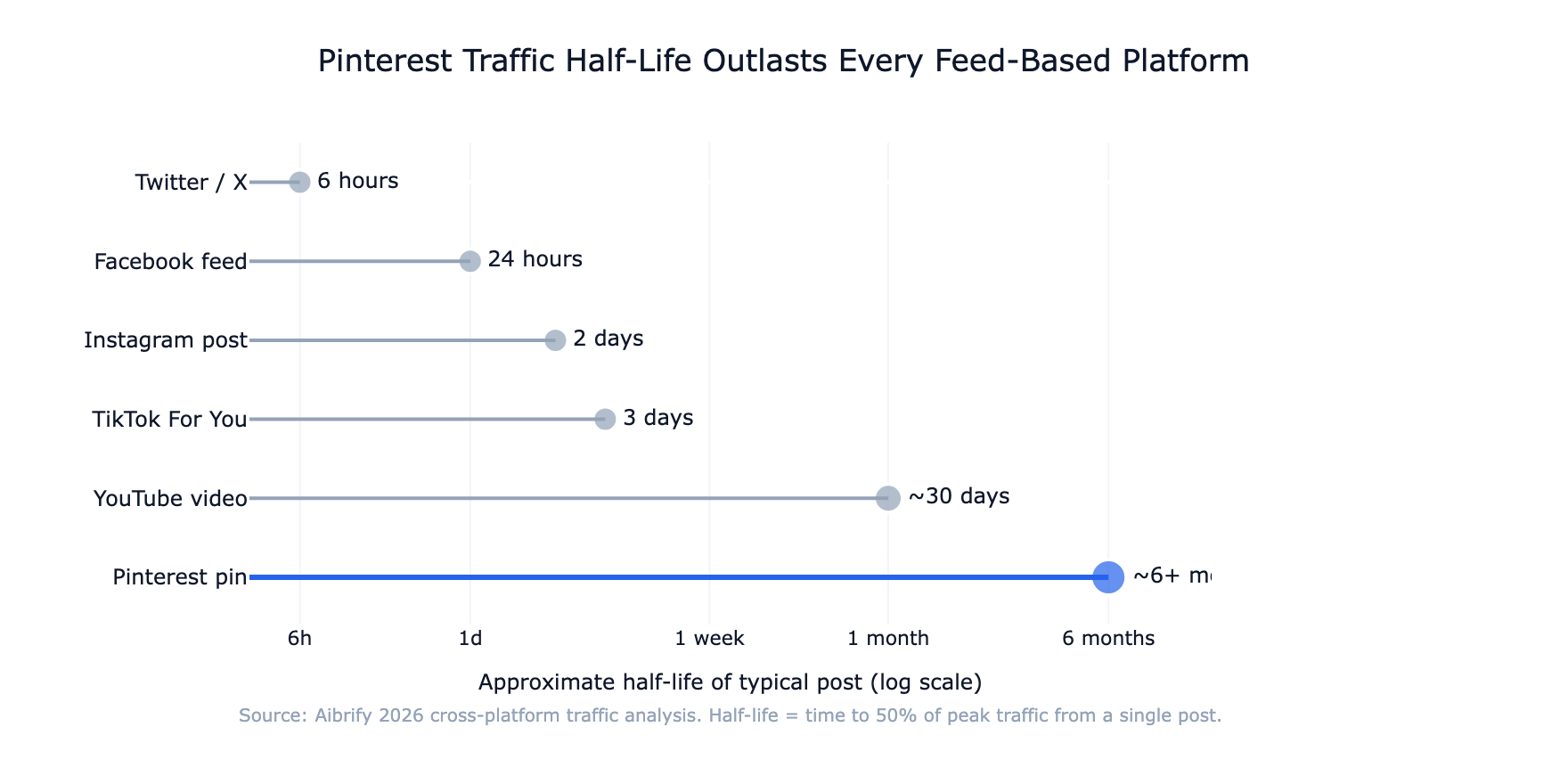
This playbook walks through what makes a Pinterest pin rank, how to read and act on the ranking signals, the idea-pin vs static-pin tradeoff, and the 5-step workflow that turns a new pin into durable search traffic.
What Pinterest ranks (and what it does not)
Pinterest's 2026 ranking signals, in rough weight order, are: save rate in the first 48 hours, outbound click-through rate, long-term repin count, pin freshness relative to the target query, topical board relevance, and account-level history. Per the Pinterest algorithm explanations published by their engineering team, the platform explicitly optimizes for "inspiration that leads to action" — which maps to clicks and saves, not impressions.
What Pinterest deprioritizes: keyword-stuffed descriptions, pins that link to low-quality landing pages, pins with text that unreadable at grid size, and square pins. The first two are content-quality signals; the second two are design signals that cost reach without changing content.
The implication for production: every pin decision — design, title, description, board — is either an SEO signal or a design signal. Pinterest is one of the few social platforms where design discipline produces measurable lift separable from content quality.
Pin design principles that win search
Three design choices account for most of the ranking difference between pins that drive traffic and pins that get ignored.
Size: 1000×1500 pixels, 2:3 vertical. Per Pinterest's image specs documentation, square pins (1:1) take less vertical space in the grid and appear less often in search results. Oversized pins beyond 2:3 used to dominate but have been progressively capped since 2023. The 1000×1500 / 2:3 format is the platform's current sweet spot.
Text overlay that reads at 236px. A pin thumbnail in the search grid is roughly 236 pixels wide. If the pin's text cannot be read at that size, users scroll past without absorbing the hook. The single non-negotiable test: shrink the pin to 236px wide and read it at arm's length. Bold sans-serif fonts, high-contrast backgrounds, and headlines under 7 words pass this test.
Visual hierarchy that rewards the second glance. Pinterest users scan grids fast, then return to pins that caught their eye for a longer look. The best pins have a primary hook readable at 236px, plus secondary visual detail that only reveals on the full-size view. This two-layer design lifts save rate in the first 48 hours — the single highest-weighted ranking signal.
How to write a pin title and description that ranks
Pinterest treats pin titles (100 characters max) and descriptions (500 characters max) as primary indexing input. The content of both is more important than the content of the image for surfacing the pin in relevant searches.
Title structure. Match a real search query, not a clever tagline. "20 small bathroom ideas under $500" outperforms "Refresh your space" because it names the exact search intent. Pinterest's SEO guidance for creators points to the search bar autocomplete as the best single keyword source — it reflects what real users are typing.
Description structure. Open with the primary search query restated in natural language (1 sentence). Follow with 2–3 sentences of context that include 3–5 related keywords the audience actually uses. Close with a specific outcome the pin delivers: "a checklist of 12 items," "ready in 30 minutes," "under $50 total." Total length 200–400 characters.
What to avoid. Hashtag walls. Keyword stuffing. Generic openings like "Check out our…" Pinterest's ranking system deprioritizes descriptions that read as tag dumps and rewards descriptions that read naturally to a human.
Static pins vs idea pins: which drives more traffic?
Idea Pins (Pinterest's multi-page, TikTok-style format) excel at in-app engagement. Saves, follows, and comments happen at 2–3x the rate of static pins. But their outbound link placement — a small icon overlay on the final page — converts at 1–3% click-through versus 5–10% for static pins with direct URL attachment.
The tradeoff is clean: brands chasing outbound traffic should invest roughly 80% of production in static pins. Brands building in-app brand presence or top-of-funnel recognition can invert the ratio. Idea Pins also have a shorter ranking lifespan — typically 1–3 months versus 6–18 months for static pins.
For most ecommerce, SaaS, and content-first brands, the math points to static pins as the primary format and Idea Pins as a 10–20% complement. Pinterest's own creator success guide frames Idea Pins as top-of-funnel discovery and static pins as bottom-of-funnel conversion — a split most brands should follow.
Board strategy: topical concentration is a ranking signal
The board a pin lives on affects how that pin ranks. A pin about small-bathroom design pinned to a generic "Home" board ranks worse than the same pin on a "Small Bathroom Inspiration" board because the latter's topical concentration signals relevance to search.
The 2026 board strategy that wins:
- 6–12 tightly themed boards covering the primary topics your content serves. Each board focuses on a single intent cluster.
- Board titles that match search queries. "Small Bathroom Inspiration" outperforms "Bathrooms" because it matches user search phrasing.
- Board descriptions with 200+ characters including relevant keywords. Boards are themselves search-indexed.
- Consistent pinning cadence per board — 2–4 new pins per board per week signals freshness to the algorithm without overwhelming the topical concentration.
Accounts with 3 boards, each containing 500 pins across 20 topics, underperform accounts with 10 boards, each containing 50 pins on 1 topic. Pinterest rewards focus at the board level the same way Google rewards topical authority at the domain level.
The 6-step workflow from publish to top-result
The production cadence that compounds into evergreen traffic has a clear shape.
Step 1: pick the search intent before designing the pin
Start with the search query, not the design. Use Pinterest search bar autocomplete to find the 8–12 queries clustering around your topic.
Pick one primary query per pin design. This sequencing matters because a pin designed for "[product] inspiration" cannot be re-purposed for "[product] under $50" without reshooting the hook.
Step 2: design at 1000×1500 with a grid-size readable hook
Template-driven design is the scale lever. A well-built Canva or Figma template generates 10 on-brand pin variants in 30–45 minutes — versus 3–4 hours for custom design per pin. The template encodes the non-negotiables: 1000×1500 dimensions, readable text at 236px, brand color palette, logo placement.
Step 3: write the title and description before publishing
The title and description are not metadata afterthoughts; they are the primary ranking input. Write them before uploading the image, not after. Tracking a spreadsheet with target query → title → description → board for each pin prevents the "I'll fill it in later" drift that destroys ranking consistency.
Step 4: pin to a topically relevant board at publish
Route each new pin to its best-match board. If no existing board is a clear fit, create one before publishing. Avoid mass-publishing to generic catch-all boards; topical concentration at the board level is a measurable ranking signal.
Step 5: publish 5-10 designs per URL over 30-60 days
For every blog post or product URL you want to drive traffic to, produce 5-10 distinct pin designs over a 30–60 day window. Not 10 identical variants — genuinely different visuals and titles targeting slightly different queries. Stagger over weeks; posting all 10 on day one produces less than 1/5 the compound ranking of posting 2 per week over 5 weeks.
Step 6: monitor save rate in the first 48 hours
Save rate in the first 48 hours is the single highest-weighted ranking signal. Check the Pinterest Analytics dashboard daily for 72 hours after each publish. Pins whose save rate falls below 0.5% in the first 48 hours rarely recover; the resources spent designing them are sunk, and the lesson is to retire the template or the query for future production.
How audience saves translate into outbound traffic
The relationship between in-app engagement and outbound traffic is not 1:1. Saves drive impressions; impressions drive clicks; clicks drive site traffic. The funnel has predictable ratios that help forecast traffic from a publishing cadence.
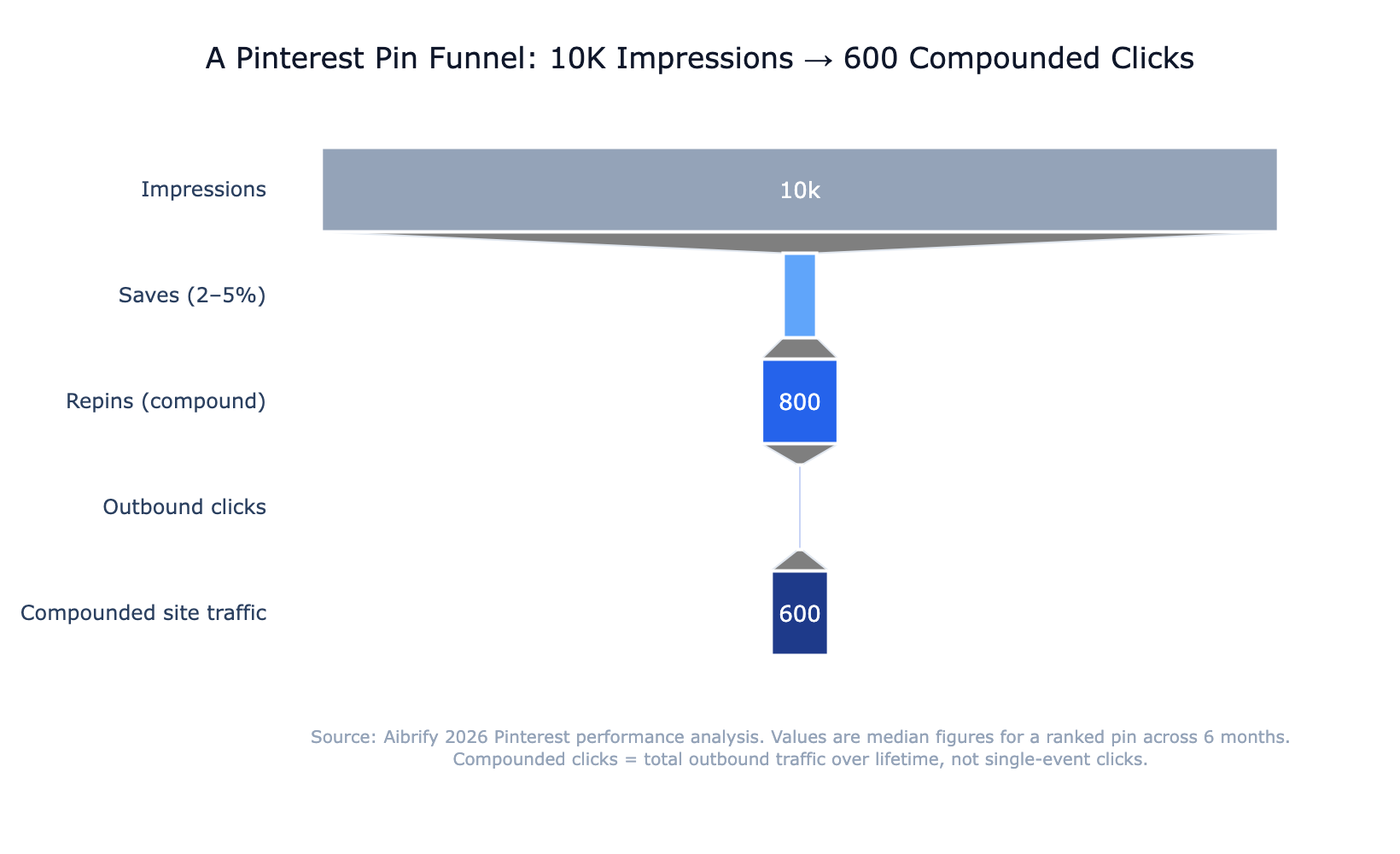
A pin that earns 10,000 impressions in its first month typically generates 200–500 saves, of which 10–50 become outbound clicks. The same pin, if it ranks, will repeat this cycle monthly for 6–18 months — turning a single design into 600–3,000 saves and 60–900 clicks over its lifetime.
Multiply this by a production cadence of 20–40 new pin designs per week and the compounding traffic math becomes obvious. The cost of the cadence is Canva templates plus an analyst hour per week; the return is a channel whose half-life exceeds any feed-based platform by orders of magnitude.
The bottom line
Pinterest is the one social platform where organic traffic compounds for months. A 2026 playbook that respects this — design at 1000×1500, write titles matching real search queries, publish 5–10 variants per URL, route to topically tight boards, monitor save rate in 48 hours — turns a Pinterest account into a durable traffic channel.
The brands winning Pinterest in 2026 are not the brands with the best photography. They are the brands who built a template library, committed to a cadence, and treated descriptions as SEO copy instead of captions.
A single afternoon spent building the template and the board structure pays for itself within a month. The traffic that flows from it keeps paying for 12+ months after.
Aibrify is a done-for-you social media management service that handles content creation, scheduling, and publishing across 7 publishing platforms including Pinterest. Managed publishing is especially valuable on Pinterest because the cadence of 20–40 fresh pins per week is what separates channels that rank from channels that sit idle.

![Pinterest Marketing 2026: Drive 5x More Traffic [Strategy]](/_next/image?url=%2Fimages%2Fblog%2Fsocial-icons.jpg&w=1920&q=75)

![120+ TikTok Captions That Go Viral [Copy & Paste 2026]](/_next/image?url=%2Fimages%2Fblog%2Fcaption-writing.jpg&w=1920&q=75)