


Why does short-form video editing burn out teams at 3 videos per week?
Because without systems, every video is a bespoke project — search the drive for usable footage, fight the auto-caption tool, re-check the pacing by feel, export to five platforms with slightly different settings. A single video eats 90–120 minutes of editor time. Three per week is 6 hours; six per week is 12; ten per week is unsustainable.
Teams producing 10+ on-brand short-form videos per week do not work faster. They work with systems that remove the repeatable decisions from each edit. Three systems account for most of the speed-up: a caption pipeline, a tagged b-roll library, and a pacing model.
This guide walks through each system with the specific rules, tooling, and time estimates teams can apply within a week.
System 1: the caption pipeline
Captions are the single most common source of quality drift in short-form video. Auto-generated captions re-time to the audio track, not to the visual cuts. When an editor trims a frame to land on a beat, the auto-caption lags, overlaps, or splits across two shots.
The 2026 caption pipeline that survives this:
Step A — auto-transcribe for text. Use DaVinci Resolve's built-in subtitle tool, CapCut's auto-caption feature, or a service like Rev.com to generate the caption text from the audio. This step is fast and its output is accurate enough for most accents.
Step B — manually re-time the in/out points. This is the step most teams skip. Drag each caption's in and out points to match the visual cuts, not the audio waveform. A caption that appears one frame after the cut and disappears one frame before the next reads as intentional; a caption that lingers from one shot into the next reads as broken.
Step C — burn in at export. Hard-code captions into the video file, do not rely on platform auto-caption. Burned-in captions are identical across every platform, survive re-compression, and cannot be toggled off by the viewer.
Step D — audit readability at 236px thumbnail. Shorts and Reels grid thumbnails render at roughly 236 pixels wide. If the caption on the opening frame is not readable at that size, users scroll past in the feed. Bold sans-serif fonts, high-contrast backgrounds, and caption text at 2–4 words per frame pass this test.
Budget 5–10 minutes per video for the re-timing step. It is the lowest-effort, highest-return habit in the entire editing workflow.
System 2: the tagged b-roll library
B-roll hunting is the single largest time sink in short-form editing. Teams producing volume without a library typically spend 60–70% of their edit time searching for the right cutaway. A 150–300 clip tagged library reclaims most of that time.
What to include in the library. Six categories cover most usage.
- Product shots — close-ups, slow pans, detail reveals, 360 rotations.
- Hands working — typing, writing, gesturing, holding products, pointing.
- Texture plates — fabric, paper, water, foliage, surfaces (useful as transitions).
- Abstract motion — light leaks, smoke, ink drops, slow-motion particles.
- Reaction shots — smiles, nods, concentration, surprise (talent-neutral if possible).
- Establishing shots — locations, rooms, skylines, streets.
How to tag. Each clip gets 5–8 descriptors: subject ("product," "hand," "texture"), motion ("slow-motion," "static," "tracking"), light quality ("warm," "cool," "natural"), use case ("intro," "transition," "payoff"). Tag structure matters more than tag volume — pick a vocabulary and stick to it.
Where to store. Airtable, Notion, or a dedicated digital asset manager like Frame.io. All support tagged search and cloud access. Local folders with filename-based naming conventions work for small teams but break at 300+ clips.
What it costs. One production week to build the initial library. 2–3 hours per month to expand it. The payoff is 60–70% faster editing within 30 days and the ability to maintain a 10+ videos per week cadence without editor burnout.
System 3: the pacing model
A short-form video that fails to retain usually fails on pacing, not content. The 2026 pacing target is a visual change every 1.5–2 seconds for videos under 60 seconds.
What counts as a visual change. A cut. A camera move (push, pull, pan, tilt). A text overlay replacement. A zoom. A color shift. A reveal. Any of these reset the viewer's attention cycle. The target is stimulus density, not edit count — a slow push-in can substitute for a cut if it delivers equivalent visual change.
How to measure. After the creative edit is complete, watch the video once with a stopwatch, clicking every visual change. Count clicks per 10-second span. The target is 5–7 clicks per 10 seconds. Below 4, the pacing reads as slow and retention drops. Above 8, the pacing reads as noise.
When to break the rule. Two specific moments warrant longer holds. The first is a visual payoff — a product reveal, a reaction, a callout — where a 3–4 second hold delivers more value than a cut. The second is a loop design at the final frame, where a clean match with the opening frame supports re-watching (a retention signal worth more than the pacing cost).
The 1.5–2 second target is a default, not a ceiling. Good editors break it deliberately, not accidentally.
What the systems produce together
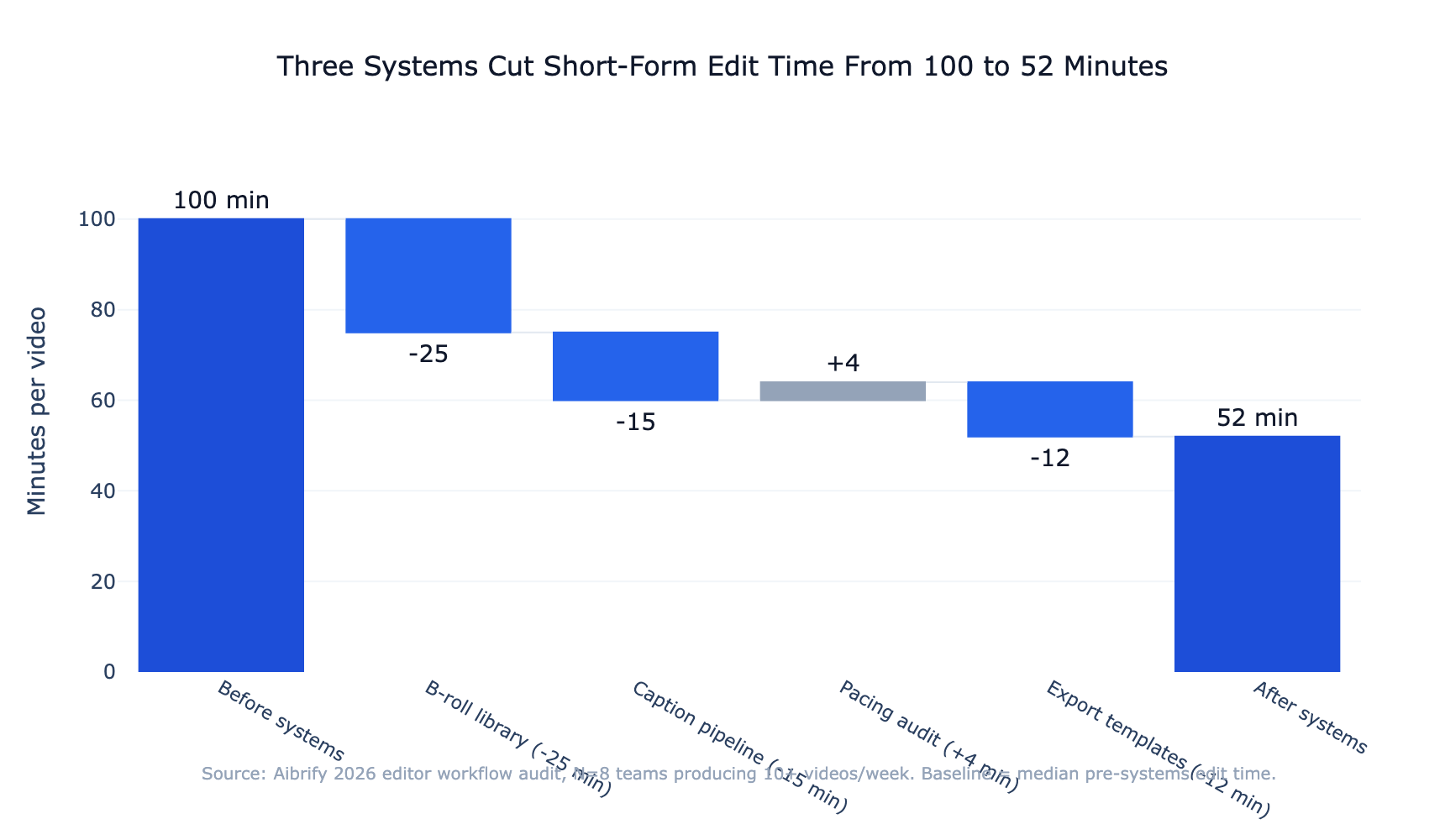
Adoption of all three systems typically cuts per-video edit time from 90–120 minutes to 25–40 minutes within 30 days, without degrading the quality markers editors care about.
The specific time breakdown shifts:
| Edit step | Before systems | After systems |
|---|---|---|
| Finding b-roll | 25–40 min | 5–10 min |
| Captions (generate + re-time) | 20–30 min | 8–12 min |
| Rough cut | 20–30 min | 15–20 min |
| Pacing audit | (skipped) | 3–5 min |
| Export to platforms | 15–20 min | 3–5 min |
| Total | 80–120 min | 34–52 min |
The compounding effect: a team of two editors moving from 6 videos per week to 12 per week at the same effort level doubles content output without hiring. Over a quarter, that is 78 additional videos — material impact on reach that was previously capacity-constrained.
The editing workflow that scales
The workflow that makes all of this operational is a stepped production loop. Treating each step as a distinct phase — rather than jumping between them — is what prevents the decision fatigue that drives editor burnout.
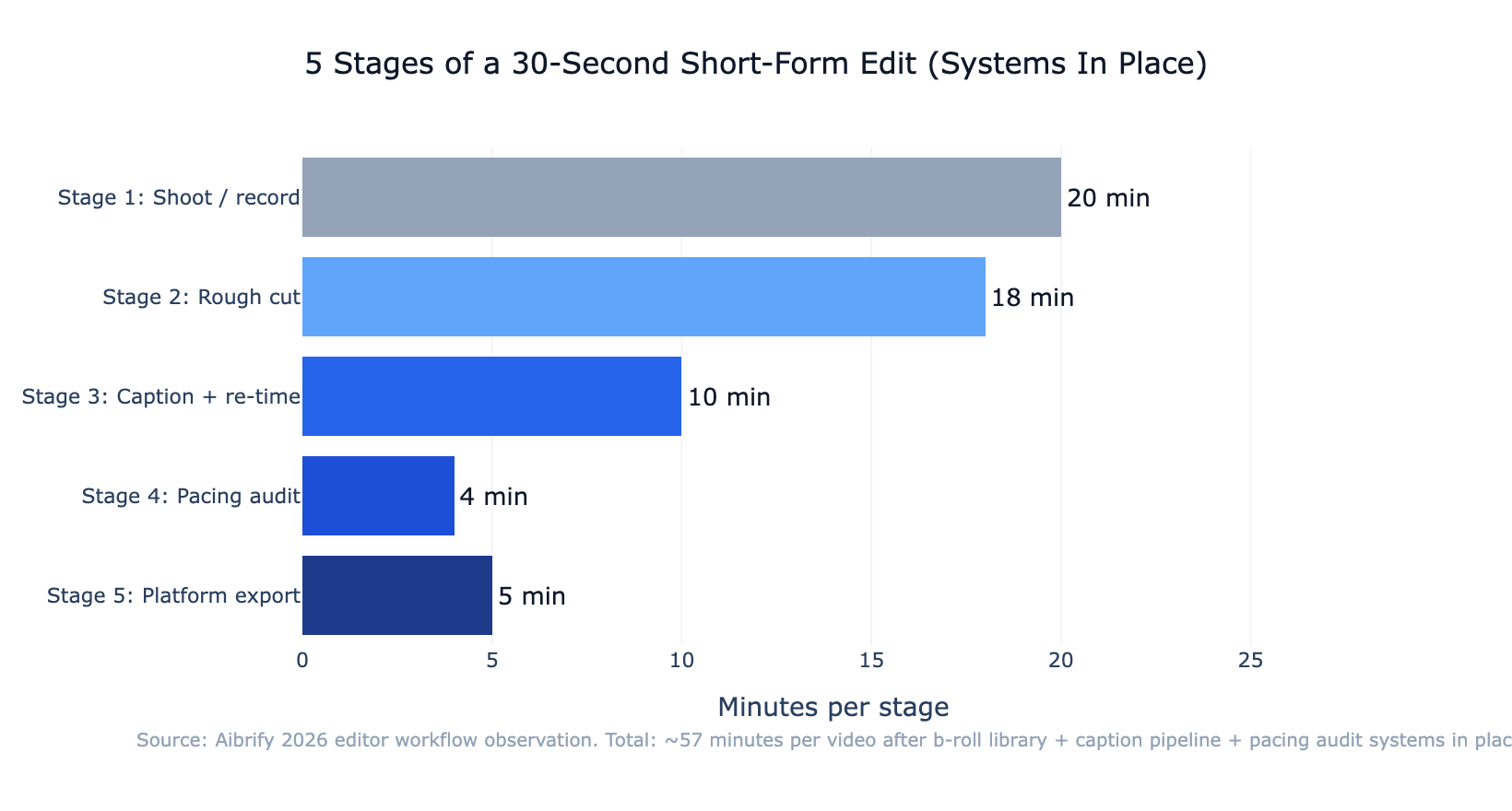
Stage 1: shoot or record raw footage. Handled separately from editing, ideally in batch sessions.
Stage 2: rough cut. Pull the primary narrative together. Insert b-roll placeholders from the library; do not yet match text to beats.
Stage 3: caption + re-time. Generate captions, then manually align in/out points to visual cuts. This is the step that most determines final quality.
Stage 4: pacing audit. Watch with a stopwatch. Tighten shots that break the 1.5–2 second target.
Stage 5: platform-specific export. Use named presets for each target platform. Avoid re-encoding; use the original color space.
Running these as discrete phases — finishing each before moving to the next — is what lets the systems compound. Mixing phases is what burns editors out.
Common failure patterns to watch for
Three patterns account for most quality regressions once a team scales.
Auto-caption drift without re-timing. The single most common failure. The video technically has captions but they lag, overlap, or split. Fix: re-time every caption before export. Tools like Submagic automate some of this but still require a final manual pass.
Over-reliance on one b-roll clip. A clip that "always works" gets over-used. Retention drops because viewers recognize the reuse. Fix: tag clip usage frequency in the library; flag any clip used more than 8 times in the last 30 videos.
Pacing that hits the target numerically but feels flat. 5–7 visual changes per 10 seconds by count, but all cuts are hard cuts at the same tempo. Fix: vary the types of visual change — mix cuts with camera moves, text overlay replacements, and slow pushes.
All three are systems failures, not taste failures. The fix in each case is a process change, not a creative one — which is why teams that commit to the systems pull ahead of teams that try to edit their way out.
The bottom line
Producing 10+ short-form videos per week without burning out editors is not about faster editing. It is about removing the repeatable decisions from every edit.
A caption pipeline that survives auto-caption drift, a tagged b-roll library that returns clips in 30 seconds, and a pacing model that treats every 1.5–2 seconds as a retention checkpoint — together these three systems cut per-video edit time by 50–70% and keep the quality markers intact.
One production week to build the systems, 30 days to see the time savings, ongoing compounding for as long as the operation runs. The math only works because the same systems support videos 11 and 12 as cheaply as videos 1 and 2.
Build the library before the next video. Write the caption re-timing step into every edit.
Run the stopwatch audit on the next export. The cadence that looked unsustainable becomes the cadence that runs on autopilot.
Aibrify is a done-for-you social media management service that handles content creation, scheduling, and publishing across 7 publishing platforms. The b-roll library structure and caption discipline described here mirror the internal editorial systems Aibrify uses to maintain brand voice at scale across client video content.

![Video Marketing Strategy 2026: Plan to Publish [Framework]](/_next/image?url=%2Fimages%2Fblog%2Fvideo-marketing.jpg&w=1920&q=75)

